a
More about React hooks
The exercises in this part of the course differ a bit from the ones before. As usual, there are some exercises related to the theory of this chapter. The other chapters of this part do not have separate exercises.
In addition, this part contains a larger exercise series that extends the BlogList application built in parts 4 and 5. Those exercises are found here.
React Hooks
React offers 18 different built-in hooks, of which the most popular ones are the useState and useEffect hooks that we have already been using extensively.
In part 5 we used the useRef and useImperativeHandle which allowed a component to provide access to their functions to other components. In part 6 we used useContext to implement a global state.
Within the last couple of years, hooks have become the standard way for libraries to expose their APIs. Throughout this course we have already seen several examples of this: Zustand provides useStore for accessing global state, React Router exposes useNavigate and useParams for programmatic navigation and URL parameter access, and React Query offers useQuery and useMutation for server state management.
As mentioned in part 1, hooks are not normal functions, and when using these we have to adhere to certain rules or limitations. Let's recap the rules of using hooks, copied verbatim from the official React documentation:
Don’t call Hooks inside loops, conditions, or nested functions. Instead, always use Hooks at the top level of your React function.
You can only call Hooks while React is rendering a function component:
- Call them at the top level in the body of a function component.
- Call them at the top level in the body of a custom Hook.
There's an existing ESlint plugin that can be used to verify that the application uses hooks correctly:
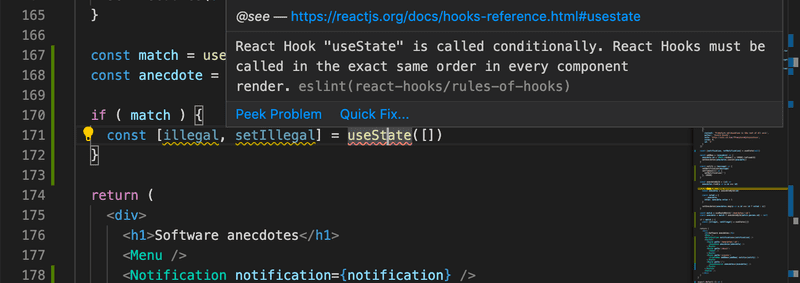
Beyond the hooks we have already used, React provides several more built-in hooks that are worth knowing. In this section we look at two of them, useMemo and useCallback which are both concerned with performance optimisation. After that we move on to custom hooks, which let you package any combination of hooks into a reusable function of your own.
useMemo
Every time a React component re-renders, the entire function body runs again. For most components this is fine, but occasionally a component performs an expensive computation, such as filtering a large list, sorting data, or deriving a complex value, and re-running it on every render wastes time.
useMemo lets you cache the result of a calculation between renders. It accepts a function that performs the computation and a dependency array. React only re-runs the function when one of the dependencies changes; otherwise it returns the previously cached result.
Consider a component that renders a large list of items filtered by a search term:
import { useState } from 'react'

const expensiveCalculation = () => {
  let sum = 0
  for (let i = 0; i < 100000; i++) sum += i
  return sum
}

const ITEMS = Array.from({ length: 10000 }, (_, i) => `item ${i + 1}`)

const FilteredList = () => {
  const [filter, setFilter] = useState('')
  const [darkMode, setDarkMode] = useState(false)

  console.log('filtering...')
  const filtered = ITEMS.filter(item => {
    expensiveCalculation()
    return item.includes(filter)
  })

  return (
    <div style={{ background: darkMode ? '#333' : '#fff' }}>
      <input
        value={filter}
        onChange={e => setFilter(e.target.value)}
        placeholder="filter items"
      />
      <button onClick={() => setDarkMode(!darkMode)}>toggle dark mode</button>
      <ul>
        {filtered.map(item => <li key={item}>{item}</li>)}
      </ul>
    </div>
  )
}

export default FilteredList
The filtering of the list takes now time, partly thanks to our artificial slowdown.
The problem of the component is that clicking the dark mode button would re-filter all 10000 items even though the filter text has not changed.
We can fix this with useMemo:
import { useState, useMemo } from 'react'
const FilteredList = () => {
  const [filter, setFilter] = useState('')
  const [darkMode, setDarkMode] = useState(false)

  const filtered = useMemo(() => {    console.log('filtering...')
    return ITEMS.filter(item => {
      expensiveCalculation()
      return item.includes(filter)
    })
  }, [filter])
  return (
    <div style={{ background: darkMode ? '#333' : '#fff' }}>
      //...
    </div>
  )
}
With useMemo, the expensive filtering only runs when filter changes. Toggling dark mode only updates the background color, and the cached filtered list is returned immediately.
The dependency array works exactly like the one in useEffect: React compares each value to the previous render. If all values are identical, the memo is reused. If any value differs, the function is re-run and the result is cached for the next render.
useMemo can also be used to memoize objects and arrays passed as props, preventing unnecessary re-renders of child components that use reference equality. For example:
const App = () => {
  const [filter, setFilter] = useState('')

  // Without useMemo, 'options' is a new object on every render even if filter hasn't changed
  const options = useMemo(() => ({ caseSensitive: false, filter }), [filter])
  return <SearchResults options={options} />
}
useMemo is a performance optimisation, you should not reach for it by default. Premature memoisation adds complexity without benefit when the computation is fast. Measure first, and only add useMemo when you have confirmed that a particular calculation is a bottleneck.
React.memo
While useMemo caches the result of a calculation inside a component, React.memo takes a different angle: it caches the rendered output of an entire component. React.memo is not a hook but a higher-order component, and we cover it here because it complements useMemo well. When a component is wrapped in React.memo, React skips re-rendering it if its props have not changed since the last render.
const MyComponent = React.memo(({ value }) => {
  console.log('rendered')
  return <div>{value}</div>
})
Without React.memo, MyComponent re-renders every time its parent renders, even if value is the same. With it, React compares the old and new props using shallow equality, and only re-renders when something has actually changed.
Note that React.memo only checks props. If the component uses a context value or its own state, it will still re-render when those change.
React.memo pairs naturally with useMemo that prevents expensive calculations from re-running, while React.memo prevents the component itself from re-rendering.
If a memoised component receives a new function or object reference on every render, the memoisation is defeated, which is where useCallback comes in.
useCallback
Functions defined inside a component are recreated as new objects on every render. This is normally harmless, but it becomes a problem in two specific situations:
- A child component wrapped in React.memo receives the function as a prop. Because the function is a new object each time, the child always sees a changed prop and re-renders anyway, defeating the purpose of memoisation.
- A function is listed as a dependency of useEffect or useMemo. A newly created function on every render means the effect or memo re-runs on every render.
useCallback solves this by caching the function itself between renders, returning the same function object as long as its dependencies have not changed. It accepts a function and a dependency array, identical in structure to useMemo.
Here is a concrete example. We have a NoteList component that is expensive to render, so we wrap it in React.memo:
// React.memo makes this component skip re-rendering if its props haven't changed
const NoteList = memo(({ onDelete, notes }) => {
  console.log('NoteList rendered')
  return (
    <ul>
      {notes.map(note => (
        <li key={note.id}>
          {note.content}
          <button onClick={() => onDelete(note.id)}>delete</button>
        </li>
      ))}
    </ul>
  )
})

const App = () => {
  const [notes, setNotes] = useState([
    { id: 1, content: 'Learn React' },
    { id: 2, content: 'Learn hooks' },
    { id: 3, content: 'Learn useMemo' },
    { id: 4, content: 'Learn useCallback' },
    { id: 5, content: 'Build something cool' },
  ])
  const [newNote, setNewNote] = useState('')

  const handleDelete = (id) => {
    setNotes(notes => notes.filter(note => note.id !== id))
  }

  const handleAdd = () => {
    setNotes(notes => [...notes, { id: Date.now(), content: newNote }])
    setNewNote('')
  }

  return (
    <div>
      <input value={newNote} onChange={e => setNewNote(e.target.value)} />
      <button onClick={handleAdd}>add</button>
      <NoteList notes={notes} onDelete={handleDelete} />
    </div>
  )
}
The problem here is that handleDelete is defined as a plain function inside App. Every time App re-renders (which happens on each keystroke into the note input), a brand new function object is created and passed to NoteList as the onDelete prop.
From React.memo's perspective the prop has changed, so NoteList re-renders even though the list itself is unchanged:
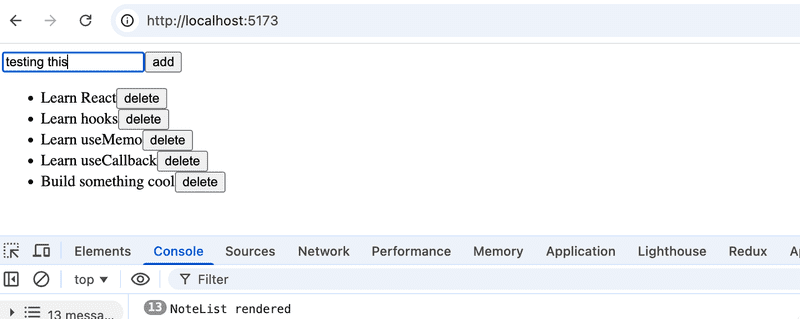
We can fix this with useCallback, which returns the same function object between renders as long as its dependencies have not changed:
import { useState, useCallback, memo } from 'react'


const App = () => {
  const [notes, setNotes] = useState([])
  const [newNote, setNewNote] = useState('')

  const handleDelete = useCallback((id) => {    setNotes(notes => notes.filter(note => note.id !== id))  }, []) // no external dependencies: this function never needs to change
  // ...
  return (
    // ...
  )
}
Now handleDelete is stable: React returns the exact same function object on every render, so React.memo sees no change in the onDelete prop and skips the re-render of NoteList entirely.
Like useMemo, reach for useCallback only when you have a concrete problem, such as a memoised child re-rendering unnecessarily or a useEffect running too often because of a function dependency. Adding it everywhere makes code harder to read without delivering a performance benefit.
Custom hooks
React offers the option to create custom hooks. According to React, the primary purpose of custom hooks is to facilitate the reuse of the logic used in components.
Building your own Hooks lets you extract component logic into reusable functions.
Custom hooks are regular JavaScript functions that can use any other hooks, as long as they adhere to the rules of hooks. Additionally, the name of custom hooks must start with the word use.
The key insight is that any stateful logic you find yourself duplicating across components is a candidate for extraction into a custom hook. Each call to the same hook creates an independent piece of state. This is what distinguishes a custom hook from a plain utility function.
We have already implemented several custom hooks in part 6. The hooks useNotes and useNoteActions were created in the Zustand section, and useCounter was defined in the React Query and Context section.
Counter hook
We implemented a counter application in part 1 that can have its value incremented, decremented, or reset. The code of the application is as follows:
import { useState } from 'react'

const App = () => {
  const [counter, setCounter] = useState(0)

  return (
    <div>
      <div>{counter}</div>
      <button onClick={() => setCounter(counter + 1)}>
        plus
      </button>
      <button onClick={() => setCounter(counter - 1)}>
        minus
      </button>
      <button onClick={() => setCounter(0)}>
        zero
      </button>
    </div>
  )
}
Let's extract the counter logic into a custom hook. The code for the hook is as follows:
const useCounter = () => {
  const [value, setValue] = useState(0)

  const increase = () => {
    setValue(value + 1)
  }

  const decrease = () => {
    setValue(value - 1)
  }

  const zero = () => {
    setValue(0)
  }

  return {
    value,
    increase,
    decrease,
    zero
  }
}
Our custom hook uses the useState hook internally to create its state. The hook returns an object, the properties of which include the value of the counter as well as functions for manipulating the value.
React components can use the hook as shown below:
const App = () => {
  const counter = useCounter()

  return (
    <div>
      <div>{counter.value}</div>
      <button onClick={counter.increase}>
        plus
      </button>
      <button onClick={counter.decrease}>
        minus
      </button>
      <button onClick={counter.zero}>
        zero
      </button>
    </div>
  )
}
By doing this we can extract the state of the App component and its manipulation entirely into the useCounter hook. Managing the counter state and logic is now the responsibility of the custom hook.
The same hook could be reused in the application that was keeping track of the number of clicks made to the left and right buttons:
const App = () => {
  const left = useCounter()
  const right = useCounter()

  return (
    <div>
      {left.value}
      <button onClick={left.increase}>
        left
      </button>
      <button onClick={right.increase}>
        right
      </button>
      {right.value}
    </div>
  )
}
The application creates two completely separate counters. The first one is assigned to the variable left and the other to the variable right. Each call to useCounter creates its own independent piece of state.
Custom hooks and component re-rendering
A natural question at this point is: when does a component that uses a custom hook actually re-render?
The answer is straightforward once you understand what a custom hook really is. A custom hook is not a separate entity from the component's perspective. It is just a piece of the component's own logic that has been moved into a separate function. This means that all the state and effects defined inside the hook belong to the component that calls the hook, not to the hook itself.
As a consequence, the re-rendering rules are exactly the same as with built-in hooks. The component re-renders when state managed inside the hook changes, when a context value the hook subscribes to changes, or when any hook the custom hook internally calls causes a re-render.
On the other hand, things like plain variables being reassigned inside the hook, or the arguments passed to the hook changing on their own do not cause a re-render.
Arguments deserve a closer look though. Passing a new value to a hook does not by itself schedule a re-render, but if the hook uses that argument as a dependency in a useEffect or useMemo, then a change in the argument will trigger the effect or memo to re-run, and if that in turn calls a state setter, the component will re-render.
A helpful way to think about it: imagine copy-pasting all the code from inside your custom hook directly into the component. The re-rendering behaviour would be identical. The hook is just a way to organise that code, not a boundary that React treats specially.
const useCounter = () => {
  const [count, setCount] = useState(0) // this state belongs to the calling component
  return { count, increment: () => setCount(c => c + 1) }
}

const MyComponent = () => {
  const { count, increment } = useCounter()
  // re-renders whenever the count state inside the hook is updated
}
Form field hook
Dealing with forms in React is somewhat tricky. The following application presents the user with a form that requires them to input their name, birthday, and height:
const App = () => {
  const [name, setName] = useState('')
  const [born, setBorn] = useState('')
  const [height, setHeight] = useState('')

  return (
    <div>
      <form>
        name:
        <input
          type='text'
          value={name}
          onChange={(event) => setName(event.target.value)}
        />
        <br/>
        birthdate:
        <input
          type='date'
          value={born}
          onChange={(event) => setBorn(event.target.value)}
        />
        <br />
        height:
        <input
          type='number'
          value={height}
          onChange={(event) => setHeight(event.target.value)}
        />
      </form>
      <div>
        {name} {born} {height}
      </div>
    </div>
  )
}
Every field of the form has its own state. To keep the state of the form synchronized with the data provided by the user, we have to register an appropriate onChange handler for each of the input elements. The pattern is identical for every field, only the state variable name differs. This is exactly the kind of repetition that custom hooks are designed to eliminate.
Let's define our own custom useField hook that simplifies the state management of the form:
const useField = (type) => {
  const [value, setValue] = useState('')

  const onChange = (event) => {
    setValue(event.target.value)
  }

  return {
    type,
    value,
    onChange
  }
}
The hook function receives the type of the input field as a parameter. It returns all of the attributes required by the input: its type, value and the onChange handler.
The hook can be used in the following way:
const App = () => {
  const name = useField('text')
  // ...

  return (
    <div>
      <form>
        <input
          type={name.type}
          value={name.value}
          onChange={name.onChange}
        />
        // ...
      </form>
// ...
      <div>
        {name.value} {born} {height}      </div>
    </div>
  )
}
Spread attributes
We could simplify things a bit further. Since the name object has exactly all of the attributes that the input element expects to receive as props, we can pass the props to the element using the spread syntax in the following way:
<input {...name} /> As the example in the React documentation states, the following two ways of passing props to a component achieve the exact same result:
<Greeting firstName='Arto' lastName='Hellas' />

const person = {
  firstName: 'Arto',
  lastName: 'Hellas'
}

<Greeting {...person} />
The application gets simplified into the following format:
const App = () => {
  const name = useField('text')
  const born = useField('date')
  const height = useField('number')

  return (
    <div>
      <form>
        name:
        <input  {...name} />
        <br/>
        birthdate:
        <input {...born} />
        <br />
        height:
        <input {...height} />
      </form>
      <div>
        {name.value} {born.value} {height.value}
      </div>
    </div>
  )
}
Dealing with forms is greatly simplified when the unpleasant nitty-gritty details related to synchronizing the state of the form are encapsulated inside our custom hook.
Persisting state with a custom hook
Custom hooks can combine several built-in hooks to encapsulate more complex behaviour. A commonly needed feature is persisting state to localStorage so that it survives a page refresh. Here is a useLocalStorage hook that wraps useState and keeps the value in sync with localStorage:
import { useState } from 'react'

const useLocalStorage = (key, initialValue) => {
  const [storedValue, setStoredValue] = useState(() => {
    try {
      const item = window.localStorage.getItem(key)
      return item ? JSON.parse(item) : initialValue
    } catch (error) {
      return initialValue
    }
  })

  const setValue = (value) => {
    try {
      setStoredValue(value)
      window.localStorage.setItem(key, JSON.stringify(value))
    } catch (error) {
      console.error(error)
    }
  }

  return [storedValue, setValue]
}
The hook accepts a storage key and an initial value. On the first render it reads from localStorage, falling back to initialValue if nothing is stored yet. The returned setter updates both React state and localStorage at the same time.
A component using it looks exactly like one using plain useState:
const App = () => {
  const [name, setName] = useLocalStorage('name', '')

  return (
    <div>
      <input value={name} onChange={e => setName(e.target.value)} />
      <p>Hello, {name}! (your name is stored in localStorage)</p>
    </div>
  )
}
The component has no idea that localStorage is involved. That concern is entirely hidden inside the hook.
More about hooks
Custom hooks are not only a tool for reusing code; they also provide a better way for dividing it into smaller modular parts.
The internet is starting to fill up with more and more helpful material related to hooks. The following sources are worth checking out:
Submission repository
Unlike in previous course parts, the exercises for this part are made in a separate repository.
So create now a new repository, inside of which you copy the contents of this repository https://github.com/fullstack-hy2020/fs-extension
All of the repository content (except the .git directory) must be copied to the root directory of your repository. So the content of your submission repository root should be exactly as follows:
.git
.github
.gitignore
routed-anecdotes
routed-anecdotes-tests
bloglist
bloglist-tests
There are also automated tests for all the apps that are developed in the exercises of this part.
From 21st September it is mandatory to have passing tests for submissions
Exercises 7.1.-7.6.
Let's once again return to working with anecdotes. Use the app found in the repository directory routed-anecdotes of the repository https://github.com/fullstack-hy2020/fs-extension as the starting point for the exercises.
7.1: useField hook
Copy the useField custom hook in the file src/hooks/index.js. The hook should manage the state of a single form input field and return an object with the following properties: type, value, and onChange.
If you use the named export instead of the default export:
import { useState } from 'react'

export const useField = (type) => {  const [value, setValue] = useState('')

  const onChange = (event) => {
    setValue(event.target.value)
  }

  return {
    type,
    value,
    onChange
  }
}

// modules can have several named exports
export const useAnotherHook = () => {  // ...
}
Then importing happens in the following way:
import  { useField } from './hooks'

const App = () => {
  // ...
  const username = useField('text')
  // ...
}
Use the hook in the anecdote creation form.
7.2: useField with reset
Add a button to the form that clears all input fields:
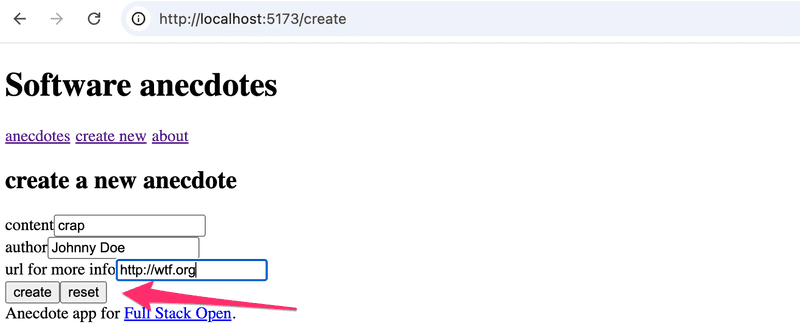
Expand the useField hook so that it exposes a reset function for clearing the field value.
Depending on your solution, you may see the following warning in your console:
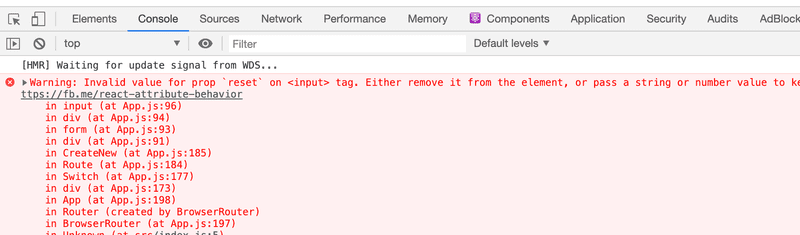
We will return to this warning in the next exercise.
7.3: Fixing the spread issue
If your solution did not cause a warning to appear in the console, you have already finished this exercise.
If you see the Invalid value for prop `reset` on <input> tag warning in the console, make the necessary changes to get rid of it.
The reason for this warning is that after making the changes to your application, the following expression:
<input {...content}/>Essentially, is the same as this:
<input
  value={content.value}
  type={content.type}
  onChange={content.onChange}
  reset={content.reset}/>
The input element should not be given a reset attribute.
One simple fix would be to not use the spread syntax and write all of the forms like this:
<input
  value={username.value}
  type={username.type}
  onChange={username.onChange}
/>
If we were to do this, we would lose much of the benefit provided by the useField hook. Instead, come up with a solution that fixes the issue, but is still easy to use with the spread syntax.
7.4: useAnecdotes, step1
The project has a JSON server already configured. You can start it with:
npm run serverThis starts a JSON Server backend that exposes the anecdotes collection as a REST resource at http://localhost:3001/anecdotes.
The existing services/anecdotes.js file contains the functions needed to communicate with the backend (except for the last exercise). Note that the service uses the Fetch API instead of Axios for HTTP requests. If you are unfamiliar with Fetch, have a look at part 6 before continuing.
The typical pattern for fetching data from a server in React looks like this:
import { useState, useEffect } from 'react'
import anecdoteService from './services/anecdotes'

const App = () => {
  const [anecdotes, setAnecdotes] = useState([])

  useEffect(() => {
    anecdoteService.getAll().then(data => setAnecdotes(data))
  }, [])

  // ...
}
Implement a custom hook useAnecdotes that encapsulates this server communication. For this exercise it is enough for the hook to fetch all anecdotes Adding new ones can be handled in the next exercise.
The hook should be used like this:
// ...
import { useAnecdotes } from './hooks'
const App = () => {
  const { anecdotes } = useAnecdotes()
  const addAnecdote = () => {} // a dummy function to keep code from breaking

  return (
    <Router>
      <div>
        <h1>Software anecdotes</h1>
        <Menu />
        <Routes>
          <Route path="/" element={<AnecdoteList anecdotes={anecdotes} />} />
          <Route path="/create" element={<CreateNew addAnecdote={addAnecdote} />} />
          <Route path="/about" element={<About />} />
        </Routes>
        <Footer />
      </div>
    </Router>
  )
}

export default App
A hint: it was previously mentioned that
A helpful way to think about it (that is, how a hook works): imagine copy-pasting all the code from inside your custom hook directly into the component.
So now you should kind of do the opposite: copy-paste the relevant code from component to the hook. This includes both hooks useState and useEffect.
7.5: useAnecdotes, step2
Extend the useAnecdotes hook so that it also supports creating new anecdotes. The hook should expose an addAnecdote function that sends the new anecdote to the server and updates the local state.
The hook should now be usable like this:
const { anecdotes, addAnecdote } = useAnecdotes()Update the App component to pass addAnecdote to the CreateNew component instead of the dummy function.
7.6: useAnecdotes, step3
Extend the useAnecdotes hook with a deleteAnecdote function that removes an anecdote from the server and updates the local state. Add a delete button next to each anecdote in the list.
Also refactor the application so that neither the anecdote data nor the hook functions are passed down as props. Instead, the components that need them should call useAnecdotes directly. This means App no longer needs to act as an intermediary passing data and callbacks through the component tree.
After the refactoring, App should look like this:
const App = () => {
  return (
    <Router>
      <div>
        <h1>Software anecdotes</h1>
        <Menu />
        <Routes>
          <Route path="/" element={<AnecdoteList />} />
          <Route path="/create" element={<CreateNew />} />
          <Route path="/about" element={<About />} />
        </Routes>
        <Footer />
      </div>
    </Router>
  )
}
Bonus: tests
From 21st September it is mandatory to have passing tests for submissions
The exercise repository https://github.com/fullstack-hy2020/fs-extension contains tests for all the apps that are developed in the exercises of this part. Run the tests for the previous exercises locally now:
cd routed-anecdotes-tests
npm install
npx playwright install chromium
npm test
All the tests should pass, if not, fix your code.
The file .github/workflows/unicafe-tests.yaml defines a GitHub Actions workflow that runs the tests on GitHub when you push code there.
Enable the tests by modifying the file as follows:
name: Routed anecdotes tests

on:
  push:
    branches: [main]
Push your code to GitHub and make sure the tests pass.