b
Complex state, fetch, testing
Let's continue extending the Zustand version of the notes application.
To make development easier, let's change the initial state so that it already contains a few notes:
const initialNotes = [    {      id: 1,      content: 'Zustand is less complex than Redux',      important: true,    }, {      id: 2,      content: 'React app benefits from custom hooks',      important: false,    }, {      id: 3,      content: 'Remember to sleep well',      important: true,    }  ]
const useNoteStore = create((set) => ({
  notes: initialNotes,
  // ...
}
More complex state
Let's implement filtering of the notes displayed in the application, allowing the visible notes to be restricted. The filter is implemented using radio buttons:
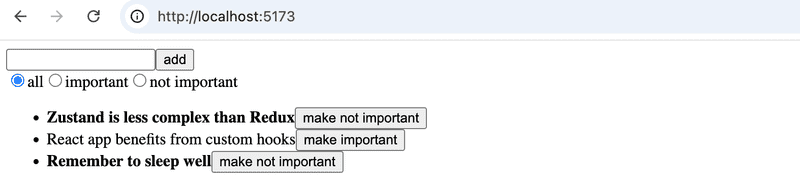
The question arises of how best to handle the filter's state management. There are essentially two options: create a separate Zustand store for the filter, or add it to the existing store. Both solutions are justifiable. The best practices found online recommend keeping completely unrelated things in separate stores. However, the list of notes and filtering are closely enough related that we will place both in the same store:
const useNoteStore = create((set) => ({
  notes: initialNotes,
  filter: 'all',  actions: {
    add: note => set(
      state => ({ notes: state.notes.concat(note) })
    ),
    toggleImportance: id => set(
      state => ({
        notes: state.notes.map(note =>
          note.id === id ? { ...note, important: !note.important } : note
        )
      })
    ),
    setFilter: value => set(() => ({ filter: value }))  }
}))

export const useNotes = () => useNoteStore((state) => state.notes)
export const useFilter = () => useNoteStore((state) => state.filter)export const useNoteActions = () => useNoteStore((state) => state.actions)
The component that sets the filter value:
import { useNoteActions } from './store'

const VisibilityFilter = () => {
  const { setFilter } = useNoteActions()

  return (
    <div>
      <input
        type="radio"
        name="filter"
        onChange={() => setFilter('all')}
        defaultChecked
      />
      all
      <input
        type="radio"
        name="filter"
        onChange={() => setFilter('important')}
      />
      important
      <input
        type="radio"
        name="filter"
        onChange={() => setFilter('nonimportant')}
      />
      not important
    </div>
  )
}

export default VisibilityFilter
The App component renders the filter:
const App = () => (
  <div>
    <NoteForm />
    <VisibilityFilter />    <NoteList />
  </div>
)
The filtering of the displayed notes could be handled in the NoteList component, for example as follows:
import { useNotes, useFilter } from './store'
import Note from './Note'

const NoteList = () => {
  const notes = useNotes()
  const filter = useFilter()
  const notesToShow = notes.filter(note => {    if (filter === 'important') return note.important    if (filter === 'nonimportant') return !note.important    return true  })
  return (
    <ul>
      {notesToShow.map(note => (        <Note key={note.id} note={note} />
      ))}
    </ul>
  )
}
A better solution is reached by including the filtering logic directly in the store's useNotes function:
import { create } from 'zustand'

const useNoteStore = create((set) => ({
  // ...
}))

export const useNotes = () => {  const notes = useNoteStore((state) => state.notes)  const filter = useNoteStore((state) => state.filter)  if (filter === 'important') return notes.filter(n => n.important)  if (filter === 'nonimportant') return notes.filter(n => !n.important)  return notes}
The function useNotes thus always returns a list of notes filtered in the desired way. The consumer of the function, the NoteList component, doesn't even need to be aware of the filter's existence:
import { useNotes } from './store'
import Note from './Note'

const NoteList = () => {
  // component gets always the properly filtered set of notes
  const notes = useNotes()

  return (
    <ul>
      {notes.map(note => (
        <Note key={note.id} note={note} />
      ))}
    </ul>
  )
}
The solution is elegant!
A possible alternative solution
An alternative would be to implement filtering directly inside a selector function, so that both the notes and the filter are read in a single useNoteStore call:
export const useNotes = () => useNoteStore(({ notes, filter }) => {
 if (filter === 'important') return notes.filter(n => n.important)
 if (filter === 'nonimportant') return notes.filter(n => !n.important)
 return notes
})
This approach does not work, however, as it leads to an infinite re-rendering loop when the filter is changed.
The reason is as follows: Zustand compares the selector's return value using the === operator. Since notes.filter(...) creates a new array on every render, React always interprets it as a new state and triggers another render, which again creates a new array, and so on.
The fix is to add useShallow, which replaces the === comparison with a shallow comparison: it compares the array elements one by one. If the content has not changed, it returns the old array reference instead of a new one, so React sees the state as stable and does not re-render.
import { useShallow } from 'zustand/react/shallow'

//...

export const useNotes = () => useNoteStore(useShallow(({ notes, filter }) => {
 if (filter === 'important') return notes.filter(n => n.important)
 if (filter === 'nonimportant') return notes.filter(n => !n.important)
 return notes
}))
The solution works, but it is slightly harder to understand. In the course material we use the earlier-presented version with two separate useNoteStore calls.
The current code of the application is available in its entirety on GitHub, in the branch part6-3.
Exercise 6.6
Let's continue with the anecdote application.
6.6 anecdotes, step5
Implement filtering of the anecdotes displayed in the application:
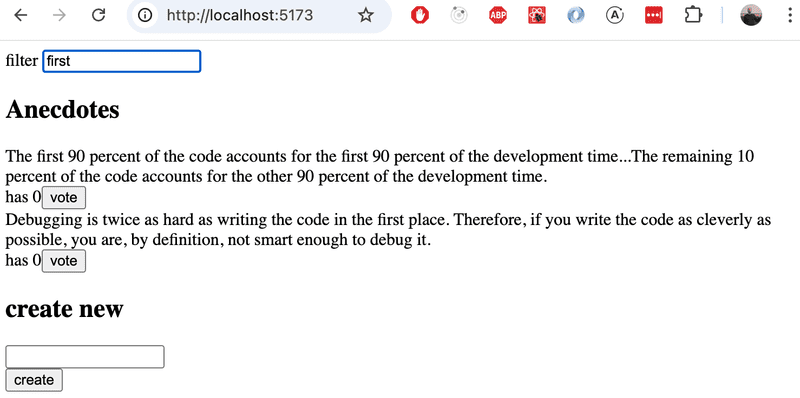
Create a Filter component for displaying the filter on screen. You can use the following as its starting point:
const Filter = () => {
  const handleChange = (event) => {
    // the value of the input field is in event.target.value
  }
  const style = {
    marginBottom: 10
  }

  return (
    <div style={style}>
      filter <input onChange={handleChange} />
    </div>
  )
}

export default Filter
Data to the server
Let's extend the application so that notes are stored in a backend. We'll use the JSON Server familiar from Part 2.
Save the initial state of the database to the file db.json at the root of the project:
{
  "notes": [
    {
      "id": 1,
      "content": "Zustand is less complex than Redux",
      "important": true
    },
    {
      "id": 2,
      "content": "React app benefits from custom hooks",
      "important": false
    },
    {
      "id": 3,
      "content": "Remember to sleep well",
      "important": true
    }
  ]
}
Install JSON Server:
npm install json-server --save-devand add the following line to the scripts section of package.json:
"scripts": {
  "server": "json-server -p 3001 db.json",
  // ...
}
Start JSON Server with the command npm run server.
Fetch API
In software development, one often has to consider whether to implement a certain feature using an external library or to take advantage of the native solutions provided by the environment. Both approaches have their own advantages and challenges.
In earlier parts of this course we have used the Axios library for making HTTP requests. Let's now get familiar with an alternative way to make HTTP requests using the native Fetch API.
It is typical that an external library like Axios is implemented using other external libraries. For example, if you install Axios in a project with the command npm install axios, the console output is:
$ npm install axios

added 23 packages, and audited 302 packages in 1s

71 packages are looking for funding
  run `npm fund` for details

found 0 vulnerabilities
So the command would install not only the Axios library but over 20 other npm packages that Axios requires to work.
The Fetch API offers a similar way to make HTTP requests as Axios, but using the Fetch API does not require installing external libraries. Application maintenance becomes easier when there are fewer libraries to update, and security also improves since the potential attack surface of the application is reduced. Application security and maintenance are touched upon in Part 7 of the course.
Making requests is done in practice by using the fetch() function. The syntax used has some differences compared to Axios. We'll also soon notice that Axios took care of some things for us and made our lives easier. We'll use the Fetch API now, however, because it is a widely-used native solution that every Full Stack developer should be familiar with.
Fetching data from the server
Let's create a function that fetches data from the backend in the file src/services/notes.js:
const baseUrl = 'http://localhost:3001/notes'

const getAll = async () => {
  const response = await fetch(baseUrl)

  if (!response.ok) {
    throw new Error('Failed to fetch notes')
  }

  const data = await response.json()
  return data
}

export default { getAll }
Let's look more closely at the implementation of the getAll function. The notes are now fetched from the backend by calling the fetch() function, which has been given the backend URL as an argument. The request type is not separately specified, so fetch performs the default action, which is a GET request.
When the response has arrived, we check whether the request succeeded by looking at the response.ok field and throw an error if necessary:
if (!response.ok) {
  throw new Error('Failed to fetch notes')
}
The attribute response.ok gets the value true if the request succeeded, i.e., if the response status code is in the range 200-299. For all other status codes, such as 404 or 500, it gets the value false.
Note that fetch does not automatically throw an error even if the response status code is, for example, 404. Error handling must be implemented manually, as we have done now.
If the request succeeded, the data contained in the response is converted to JSON format:
const data = await response.json()fetch does not automatically convert the data that may accompany the response to JSON format; the conversion must be done manually. It is also worth noting that response.json() is an asynchronous function, so the await keyword must be used with it.
Let's simplify the code a bit by returning the data returned by the response.json() function directly:
const getAll = async () => {
  const response = await fetch(baseUrl)

  if (!response.ok) {
    throw new Error('Failed to fetch notes')
  }

  return await response.json()}
Let's add a function to the store that can be used to initialize the state with notes fetched from the server:
const useNoteStore = create((set) => ({
  notes: [],  filter: '',
  actions: {
    // ...
    setFilter: value => set(() => ({ filter: value })),
    initialize: notes => set(() => ({ notes }))  }
}))
Let's implement the initialization of notes in the App component — as usual when fetching data from a server, we use the useEffect hook:
const App = () => {
  const { initialize } = useNoteActions()

  useEffect(() => {    noteService.getAll().then(notes => initialize(notes))  }, [initialize])
  return (
    <div>
      <NoteForm />
      <VisibilityFilter />
      <NoteList />
    </div>
  )
}
The notes are thus fetched from the server using the getAll() function we defined and then stored using the store's initialize function. These actions are done in the useEffect hook, meaning they are executed during the first render of the App component.
Let's look more closely at one small detail. We have added the initialize function to the dependency array of the useEffect hook. If we try to use an empty dependency array, ESLint gives the following warning: React Hook useEffect has a missing dependency: 'initialize'. What is going on?
The code would work logically exactly the same even if we used an empty dependency array, because initialize refers to the same function throughout the program's execution. However, it is good programming practice to add all variables and functions used by the useEffect hook that are defined inside the component to the dependencies. This helps avoid unexpected bugs.
Sending data to the server
Let's next implement the functionality for sending a new note to the server. At the same time we can practice how to make a POST request using the fetch() function.
Let's extend the server communication code in src/services/notes.js as follows:
const baseUrl = 'http://localhost:3001/notes'

const getAll = async () => {
  const response = await fetch(baseUrl)

  if (!response.ok) {
    throw new Error('Failed to fetch notes')
  }

  return await response.json()
}

const createNew = async (content) => {  const response = await fetch(baseUrl, {    method: 'POST',    headers: { 'Content-Type': 'application/json' },    body: JSON.stringify({ content, important: false }),  })    if (!response.ok) {    throw new Error('Failed to create note')  }    return await response.json()}
export default { getAll, createNew }
Let's look more closely at the implementation of the createNew function. The first parameter of the fetch() function specifies the URL to which the request is made. The second parameter is an object that defines the other details of the request, such as the request type, headers and the data sent with the request. We can further clarify the code by storing the object defining the request details in a separate options helper variable:
const createNew = async (content) => {
  const options = {    method: 'POST',    headers: { 'Content-Type': 'application/json' },    body: JSON.stringify({ content, important: false }),  }    const response = await fetch(baseUrl, options)
  if (!response.ok) {
    throw new Error('Failed to create note')
  }

  return await response.json()
}
Let's look more closely at the options object:
- method defines the request type, which in this case is POST
- headers defines the request headers. We attach the header 'Content-Type': 'application/json' to the request so that the server knows that the data included with the request is in JSON format, and can handle the request correctly
- body contains the data to be sent with the request. The field cannot directly contain a JavaScript object, it must first be converted to a JSON string by calling JSON.stringify()
As with the GET request, we also check the response status code here for errors:
if (!response.ok) {
  throw new Error('Failed to create note')
}
If the request succeeds, JSON Server returns the just-created note, for which it has also generated a unique id. The data contained in the response must still be converted to JSON format using the response.json() function:
return await response.json()Let's then change our application's NoteForm component so that a new note is sent to the backend. The component's addNote function changes slightly:
import { useNoteActions } from './store'
import noteService from './services/notes'

const NoteForm = () => {
  const { add } = useNoteActions()

  const addNote = async (e) => {
    e.preventDefault()
    const content = e.target.note.value
    const newNote = await noteService.createNew(content)    add(newNote)
    e.target.reset()
  }

  return (
    <form onSubmit={addNote}>
      <input name="note" />
      <button type="submit">add</button>
    </form>
  )
}

export default NoteForm
When a new note is created in the backend by calling the function createNew(), we get back an object describing the note, for which the backend has generated an id.
The current code of the application is available in its entirety on GitHub, in the branch part6-4.
Async actions
Our approach is fairly good, but in one sense unfortunate, in that the communication with the server happens inside the code of the functions that define the components. It would be better if the communication could be abstracted away from the components, so that they only need to call an appropriate function that the store provides.
We want App to initialize the application state as follows:
const App = () => {
  const { initialize } = useNoteActions()
  useEffect(() => {
    initialize()  }, [initialize])

  return (
    <div>
      <NoteForm />
      <VisibilityFilter />
      <NoteList />
    </div>
  )
}
NoteForm in turn creates a new note like this:
const NoteForm = () => {
  const { add } = useNoteActions()
  const addNote = async (e) => {
    e.preventDefault()
    const content = e.target.note.value
    await add(content)    e.target.reset()
  }

  return (
    <form onSubmit={addNote}>
      <input name="note" />
      <button type="submit">add</button>
    </form>
  )
}
The change to store.js is as follows:
import { create } from 'zustand'
import noteService from './services/notes'
const useNoteStore = create((set) => ({
  notes: [],
  filter: '',
  actions: {
    add: async (content) => {      const newNote = await noteService.createNew(content)      set(state => ({ notes: state.notes.concat(newNote) }))
    },
    initialize: async () => {      const notes = await noteService.getAll()      set(() => ({ notes }))
    },
    // ...
  }
}))
The functions add and initialize have thus been changed into asynchronous functions, which first call the appropriate noteService function, and then update the state.
The solution is elegant; state management and communication with the server are entirely separated outside of React components.
Let's finalize the application by synchronizing the importance toggle change to the server.
noteService.js is extended as follows:
const update = async (id, note) => {
  const response = await fetch(`${baseUrl}/${id}`, {
    method: 'PUT',
    headers: { 'Content-Type': 'application/json' },
    body: JSON.stringify(note),
  })

  if (!response.ok) {
    throw new Error('Failed to update note')
  }

  return await response.json()
}

export default { getAll, createNew, update }
The change to the store's toggleImportance function is as follows:
const useNoteStore = create((set) => ({
  notes: [],
  filter: '',
  actions: {
    add: async (content) => {
      const newNote = await noteService.createNew(content)
      set(state => ({ notes: state.notes.concat(newNote) }))
    },
    toggleImportance: async (id) => {      const note = useNoteStore.getState().notes.find(n => n.id === id)      const updated = await noteService.update(        id, { ...note, important: !note.important }      )      set(state => ({        notes: state.notes.map(n => n.id === id ? updated : n)      }))    },    setFilter: value => set(() => ({ filter: value })),
    initialize: async () => {
      const notes = await noteService.getAll()
      set(() => ({ notes }))
    }
  }
}))
There is one noteworthy detail in the new function. The function receives the note's id as a parameter. However, the modified note must be sent to the backend. It can be found by calling the store's getState function:
const note = useNoteStore.getState().notes.find(n => n.id === id)Zustand stores also have a number of other helper functions, which may be useful in some situations.
Let's however also change the store definition so that we also pass the parameter get to the function given to create, through which we can then access the state values when needed:
const useNoteStore = create((set, get) => ({  notes: [],
  filter: '',
  actions: {
    toggleImportance: async (id) => {
      const note = get().notes.find(n => n.id === id)      const updated = await noteService.update(
        id, { ...note, important: !note.important }
      )
      set(state => ({
        notes: state.notes.map(n => n.id === id ? updated : n)
      }))
    },
    // ...
  }
}))
The function get returns the current state of the store. For example, the call get().notes gives the store's current notes. The function get is functionally equivalent to calling useNoteStore.getState(), but is the most idiomatic way to refer to the store's state from within the store's own functions.
The code of the application is on GitHub in the branch part6-5.
Exercises 6.7.-6.11.
6.7 anecdotes, step6
Fetch the anecdotes from the JSON Server backend when the application starts. Use the Fetch API to make the HTTP request.
You can find the initial content for the backend e.g. here.
6.8 anecdotes, step7
Change the creation of new anecdotes so that anecdotes are stored in the backend. Use the Fetch API in your implementation.
6.9 anecdotes, step8
Voting does not yet save changes to the backend. Fix the situation.
6.10 anecdotes, step9
The application has a ready-made skeleton for the Notification component:
const Notification = () => {
  const style = {
    border: 'solid',
    padding: 10,
    borderWidth: 1,
    marginBottom: 10
  }

  return (
    <div style={style}>
      render here notification...
    </div>
  )
}

export default Notification
Extend the application so that it shows a notification using the Notification component for five seconds when anecdotes are voted on or new anecdotes are created:
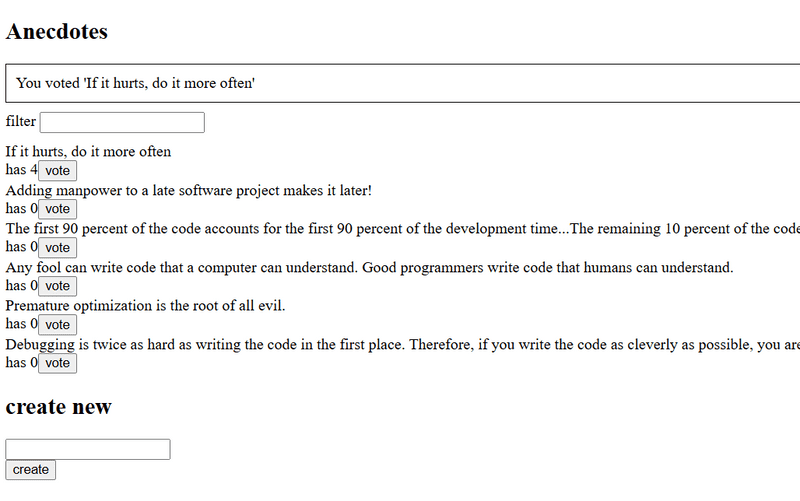
Use Zustand for notification state management. It may be a good idea to create a separate Zustand store for notifications, since notification usage may expand to other areas of the application as it grows, such as user login.
6.11 anecdotes, step10
We notice that some of the anecdotes added by users are not very good. Implement a feature that allows deleting anecdotes that have zero votes.
Bonus: anecdotes tests
From 21st September it is mandatory to have passing tests for submissions
The exercise repository https://github.com/fullstack-hy2020/fs-statemanagement also contains tests for the Anecdotes app.
Ensure that the tests now pass locally:
cd anecdotes-tests
npm install
npx playwright install chromium
npm test
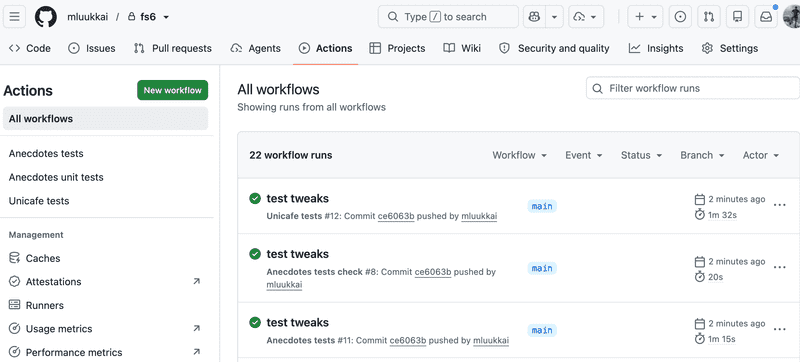
The file .github/workflows/anecdotes-tests.yaml defines a GitHub Actions workflow that runs the tests also on GitHub. Enable the tests by modifying the file as follows:
Highlighted lines: 5 name: Anecdotes tests
on:
  push:
    branches: [main]
Push your code to GitHub and make sure the tests work!
Middlewares
When developing an application, one often encounters situations where it is hard to understand why the application behaves unexpectedly. The state changes as a result of some action function call, but it is unclear which call changed what and in which order. Traditional console logging of individual functions only helps to a limited extent.
Zustand supports so-called middlewares, which can be used to add functionality to stores transparently, without touching the store's own logic. The idea of middleware is simple: it "wraps" around the store and can, for example, automatically log every state change.
The form of middleware functions is somewhat cryptic. Below is a logger that always prints the store's old and new state whenever the state changes:
const logger = (config) => (set, get) => config(
  (...args) => {
    console.log('prev state', get());
    set(...args);
    console.log('next state', get());
  },
  get
);
The middleware is activated by "wrapping" the function given to Zustand's create as its parameter:
const useNoteStore = create(logger((set, get) => ({  notes: [],
  filter: '',
  actions: {
    // ...
  }
})))
Now whenever the store's state changes, we can always see in the console how the state changes:
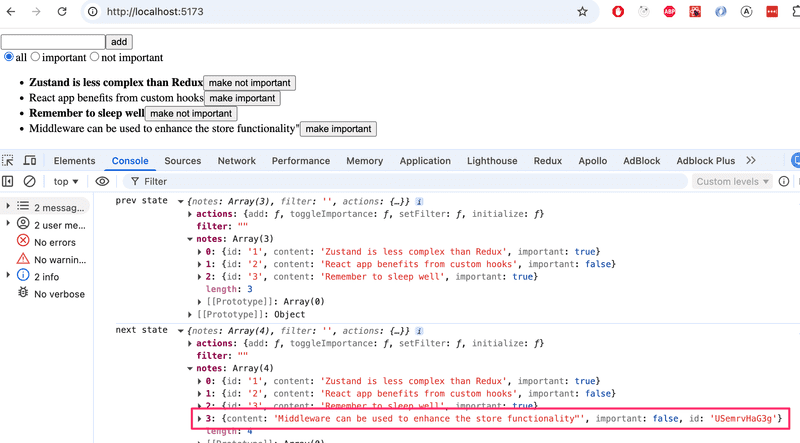
In practice our defined middleware works by replacing the original function set with the function
  (...args) => {
    console.log('prev state', get());
    set(...args);
    console.log('next state', get());
  }
which in addition to calling set, also prints the old and new state (accessible via the get function) to the console. The second parameter is the old get unchanged.
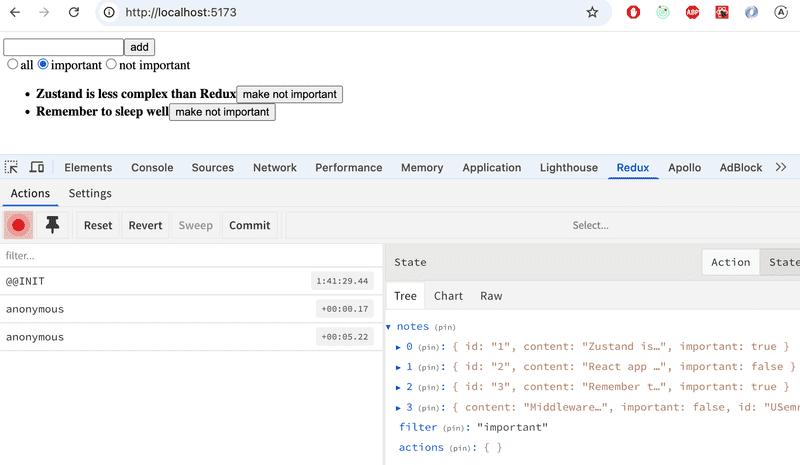
Zustand also has a ready-made devtools middleware that integrates the store with the browser's Redux DevTools extension. Devtools is an extremely useful development tool, as it allows you to visually track state changes.
The setup is straightforward:
import { create } from 'zustand'
import { devtools } from 'zustand/middleware'
const useNoteStore = create(devtools((set, get) => ({  notes: [],
  filter: '',
  actions: {
    // ...
  }
})))
When the Redux DevTools extension is installed in the browser, the state of the store and its changes can be inspected in the browser's developer tools:
Testing Zustand stores
Finally, let's look at testing Zustand stores with Vitest.
For simplicity, let's start with the counter store:
import { create } from 'zustand'

const useCounterStore = create(set => ({
  counter: 0,
  actions: {
    increment: () => set(state => ({ counter: state.counter + 1 })),
    decrement: () => set(state => ({ counter: state.counter - 1 })),
    zero: () => set(() => ({ counter: 0 })),
  }
}))

export const useCounter = () => useCounterStore(state => state.counter)
export const useCounterControls = () => useCounterStore(state => state.actions)

export default useCounterStore
We added an export to the definition for the tests, through which the test can access the store.
Let's install Vitest:
npm install --save-dev vitestLet's implement the test in the file store.test.js:
import { beforeEach, describe, expect, it } from 'vitest'
import useCounterStore from './store'

beforeEach(() => {
  useCounterStore.setState({ counter: 0 })
})

describe('counter store', () => {
  it('initial state is 0', () => {
    expect(useCounterStore.getState().counter).toBe(0)
  })

  it('increment increases counter by 1', () => {
    useCounterStore.getState().actions.increment()
    expect(useCounterStore.getState().counter).toBe(1)
  })

  it('decrement decreases counter by 1', () => {
    useCounterStore.getState().actions.decrement()
    expect(useCounterStore.getState().counter).toBe(-1)
  })

  it('zero resets counter to 0', () => {
    useCounterStore.getState().actions.increment()
    useCounterStore.getState().actions.increment()
    useCounterStore.getState().actions.zero()
    expect(useCounterStore.getState().counter).toBe(0)
  })
})
The tests are quite straightforward, utilizing the store's getState function, which allows them to read the store's state and execute the store's functions.
Before each test, the store is reset to its initial state in the beforeEach block using the store's setState function.
Resetting the store to its initial state is simple in our case. This is not always necessarily so. Zustand's documentation describes a way to create a version of stores for testing that is automatically reset to its initial state before each test. The method is, however, complex enough and unnecessary for us that we will skip it for now.
The tests thus use the store directly. If more complex logic has been implemented through custom hooks for using the store, it may be necessary to write tests that also utilize the hooks. In the counter, store usage happens through the hooks useCounter and useCounterControls:
const useCounterStore = create(set => ({
  // ...
}))

// hightlight-start
export const useCounter = () => useCounterStore(state => state.counter)
export const useCounterControls = () => useCounterStore(state => state.actions)
// hightlight-end
In this case the hooks do not contain any logic, they just separately expose the value stored in the store and the store's functions. The testing approach we used above is therefore perfectly fine.
Let's however make another version of the tests for example purposes, where the store is used in exactly the same way as the application uses it.
useCounter and useCounterControls are React hooks, so testing them requires React Testing Library and the jsdom library:
npm install --save-dev @testing-library/react jsdomLet's add the testing environment configuration to vite.config.js:
import { defineConfig } from 'vite'
import react from '@vitejs/plugin-react'

export default defineConfig({
  plugins: [react()],
  test: {    environment: 'jsdom',  },})
The tests are as follows:
import { beforeEach, describe, expect, it } from 'vitest'
import { renderHook, act } from '@testing-library/react'
import useCounterStore, { useCounter, useCounterControls } from './store'

beforeEach(() => {
  useCounterStore.setState({ counter: 0 })
})

describe('counter hooks', () => {
  it('useCounter returns initial value of 0', () => {
    const { result } = renderHook(() => useCounter())
    expect(result.current).toBe(0)
  })

  it('increment updates counter', () => {
    const { result: counter } = renderHook(() => useCounter())
    const { result: controls } = renderHook(() => useCounterControls())

    act(() => controls.current.increment())

    expect(counter.current).toBe(1)
  })

  it('decrement updates counter', () => {
    const { result: counter } = renderHook(() => useCounter())
    const { result: controls } = renderHook(() => useCounterControls())

    act(() => controls.current.decrement())

    expect(counter.current).toBe(-1)
  })

  it('zero resets counter', () => {
    const { result: counter } = renderHook(() => useCounter())
    const { result: controls } = renderHook(() => useCounterControls())

    act(() => {
      controls.current.increment()
      controls.current.increment()
      controls.current.zero()
    })

    expect(counter.current).toBe(0)
  })
})
There are a few interesting things in the test. At the start of the tests, the hooks are rendered using the renderHook function:
const { result: counter } = renderHook(() => useCounter())
const { result: controls } = renderHook(() => useCounterControls())
This way the test gets access to the values returned by the hooks, which are stored in the variables counter and controls.
The hooks are called by wrapping the call inside the act function:
act(() => {
  controls.current.increment()
  controls.current.increment()
  controls.current.zero()
})
Finally, the test expectation occurs:
expect(counter.current).toBe(0)As we can see, to access the hook itself we still need to take the current field from the object returned by renderHook, which corresponds to the hook's current value.
What is act?
act is a helper function that ensures all state updates and their side effects have been processed before the test code continues.
When a state change occurs in a React component or hook, React does not update the state immediately but queues the updates. act forces these queued updates to be executed.
Without act, a test might check the state before React has had time to update it, causing the test to fail or give incorrect results.
React Testing Library wraps many of its functions (such as fireEvent, userEvent) in act automatically, but when testing hooks directly it is usually needed.
Testing via hooks uses React Testing Library and renders the hooks in a real React context using jsdom. This approach is considerably slower than tests that use the store directly, so if the hooks do not contain complex logic, it may be sufficient to run the tests using the store directly.
The code containing the Zustand counter tests is available on GitHub.
Testing the notes store
Testing the store of the note application is a somewhat more challenging case, since the store contains asynchronous functions that call the server:
import { create } from 'zustand'
import noteService from './services/notes'

const useNoteStore = create(set => ({
  notes: [],
  filter: '',
  actions: {
    add: async (content) => {
      const newNote = await noteService.createNew(content)      set(state => ({ notes: state.notes.concat(newNote) }))
    },
    toggleImportance: async (id) => {
      const note = useNoteStore.getState().notes.find(n => n.id === id)
      const updated = await noteService.update(        id, { ...note, important: !note.important }      )      set(state => ({
        notes: state.notes.map(n => n.id === id ? updated : n)
      }))
    },
    setFilter: value => set(() => ({ filter: value })),
    initialize: async () => {
      const notes = await noteService.getAll()      set(() => ({ notes }))
    }
  }
}))

export const useNotes = () => {
  const notes = useNoteStore((state) => state.notes)
  const filter = useNoteStore((state) => state.filter)

  if (filter === 'important') return notes.filter(n => n.important)
  if (filter === 'nonimportant') return notes.filter(n => !n.important)
  return notes
}

export const useFilter = () => useNoteStore((state) => state.filter)
export const useNoteActions = () => useNoteStore((state) => state.actions)
This time useNotes also contains a significant amount of logic, so testing should probably be done via hooks with React Testing Library.
Let's install the required libraries:
npm install --save-dev vitest @testing-library/react jsdomLet's add the testing environment configuration to vite.config.js:
import { defineConfig } from 'vite'
import react from '@vitejs/plugin-react'

export default defineConfig({
  plugins: [react()],
  test: {    environment: 'jsdom',  },})
The first part of the tests is as follows:
import { describe, it, expect, beforeEach, vi } from 'vitest'
import { renderHook, act } from '@testing-library/react'

vi.mock('./services/notes', () => ({
  default: {
    getAll: vi.fn(),
    createNew: vi.fn(),
    update: vi.fn(),
  }
}))

import noteService from './services/notes'
import useNoteStore, { useNotes, useFilter, useNoteActions } from './store'

beforeEach(() => {
  useNoteStore.setState({ notes: [], filter: '' })
  vi.clearAllMocks()
})

describe('useNoteActions', () => {
  it('initialize loads notes from service', async () => {
    const mockNotes = [{ id: 1, content: 'Test', important: false }]
    noteService.getAll.mockResolvedValue(mockNotes)

    const { result } = renderHook(() => useNoteActions())

    await act(async () => {
      await result.current.initialize()
    })

    const { result: notesResult } = renderHook(() => useNotes())
    expect(notesResult.current).toEqual(mockNotes)
  })

  it('add appends a new note', async () => {
    const newNote = { id: 2, content: 'New note', important: false }
    noteService.createNew.mockResolvedValue(newNote)

    const { result } = renderHook(() => useNoteActions())

    await act(async () => {
      await result.current.add('New note')
    })

    const { result: notesResult } = renderHook(() => useNotes())
    expect(notesResult.current).toContainEqual(newNote)
  })

  it('toggleImportance flips important flag', async () => {
    const note = { id: 1, content: 'Test', important: false }
    useNoteStore.setState({ notes: [note] })
    noteService.update.mockResolvedValue({ ...note, important: true })

    const { result } = renderHook(() => useNoteActions())

    await act(async () => {
      await result.current.toggleImportance(1)
    })

    const { result: notesResult } = renderHook(() => useNotes())
    expect(notesResult.current[0].important).toBe(true)
  })
})
There is a lot to digest in the tests. The tests create, using Vitest, a mock version of the noteService responsible for communicating with the server:
import { describe, it, expect, beforeEach, vi } from 'vitest'

vi.mock('./services/notes', () => ({
  default: {
    getAll: vi.fn(),
    createNew: vi.fn(),
    update: vi.fn(),
  }
}))
vi.mock replaces the noteService in the ./services/notes module with its own version, where all functions are replaced with mock functions returned by vi.fn.
Before each test, the store is reset to its initial state and the mock functions are cleared:
beforeEach(() => {
  useNoteStore.setState({ notes: [], filter: '' })
  vi.clearAllMocks()
})
At the start of each test, the mocked noteService is told via the mockResolvedValue function how it should behave in the context of the test:
it('initialize loads notes from service', async () => {
  const mockNotes = [{ id: 1, content: 'Test', important: false }]  noteService.getAll.mockResolvedValue(mockNotes)
  const { result } = renderHook(() => useNoteActions())

  await act(async () => {
    await result.current.initialize()
  })

  const { result: notesResult } = renderHook(() => useNotes())
  expect(notesResult.current).toEqual(mockNotes)
})
First, the test defines that when the noteService.getAll function is called, the notes in the mockNotes array are returned to the store.
The thing being tested is the call to the initialize function:
await act(async () => {
  await result.current.initialize()
})
Since this is an asynchronous function, the completion of the call must be awaited with the await keyword.
Finally, the test verifies that the store's state contains the same list of notes that the mocked noteService.getAll returned:
const { result: notesResult } = renderHook(() => useNotes())
expect(notesResult.current).toEqual(mockNotes)
The other tests follow the same pattern: first, what the store's called noteService function returns is defined, and then the actual test is run.
The second part of the tests verifies that filtering works correctly:
describe('useNotes filtering', () => {
  const notes = [
    { id: 1, content: 'A', important: true },
    { id: 2, content: 'B', important: false },
  ]

  beforeEach(() => {
    useNoteStore.setState({ notes })
  })

  it('returns all notes with no filter', () => {
    const { result } = renderHook(() => useNotes())
    expect(result.current).toHaveLength(2)
  })

  it('filters important notes', () => {
    useNoteStore.setState({ notes, filter: 'important' })
    const { result } = renderHook(() => useNotes())
    expect(result.current).toEqual([notes[0]])
  })

  it('filters nonimportant notes', () => {
    useNoteStore.setState({ notes, filter: 'nonimportant' })
    const { result } = renderHook(() => useNotes())
    expect(result.current).toEqual([notes[1]])
  })
})
The state is initialized with two notes, one of which is important and the other is not. The three test cases verify that useNotes returns the correct notes for all filter values.
The application's final code is on GitHub in the branch part6-6.
Exercises 6.12.-6.15.
6.12 Anecdotes, step11
Write a test that verifies the state is initialized with the anecdotes returned by the backend.
6.13 Anecdotes, step12
Write a test that verifies the component displaying anecdotes receives the anecdotes from the store sorted by votes.
6.14 Anecdotes, step13
Write a test that verifies the correct React component receives a properly filtered list of anecdotes.
6.15 Anecdotes, step14
Write a test that verifies that voting increases the number of votes for an anecdote.
Bonus: testing the tests
From 21st September it is mandatory to have passing tests for submissions
The exercise repository https://github.com/fullstack-hy2020/fs-typescript also contains some "tests" for the tests you did in previous exercises.
Ensure that the checks pass locally:
cd anecdotes-tests
npm run verify:tests-are-real
The file .github/workflows/anecdotes-tests.yaml defines a GitHub Actions workflow for the checks. Enable them by modifying the file as follows:
name: Anecdotes tests check

on:
  push:
    branches: [main]
Push your code to GitHub and make sure the all the workflows are green: