a
Flux-architecture and Zustand
We have followed React's recommended practice for managing application state by defining the state needed by multiple components and the functions that handle it in the top-level components of the component hierarchy. Most of the state and the functions handling it have typically been defined directly in the root component and passed via props to the components that need them. This works up to a point, but as the application grows, state management becomes challenging.
Flux architecture
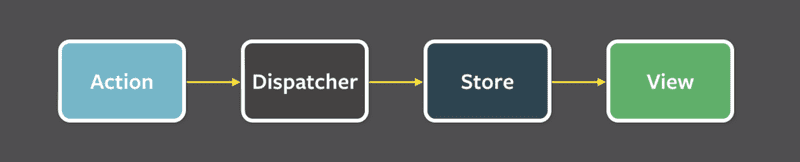
Facebook developed the Flux architecture in the early days of React's history to ease state management problems. In Flux, the management of application state is separated entirely into external stores outside of React components. The state in the store is not changed directly but through specific actions that are created to that purpose.
When an action changes the store's state, the views are re-rendered:
If the use of the application (e.g., pressing a button) causes a need to change the state, the change is made through an action. This in turn causes the view to be re-rendered:
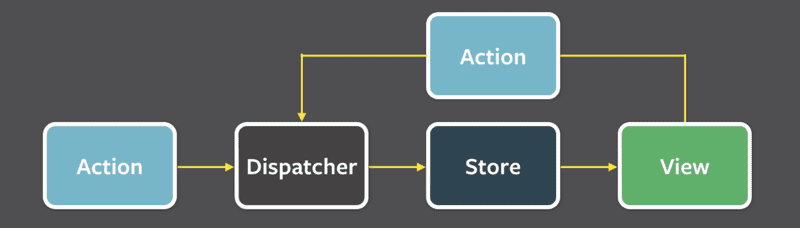
Flux thus provides a standard way for how and where the application state is kept and for making changes to it.
Redux
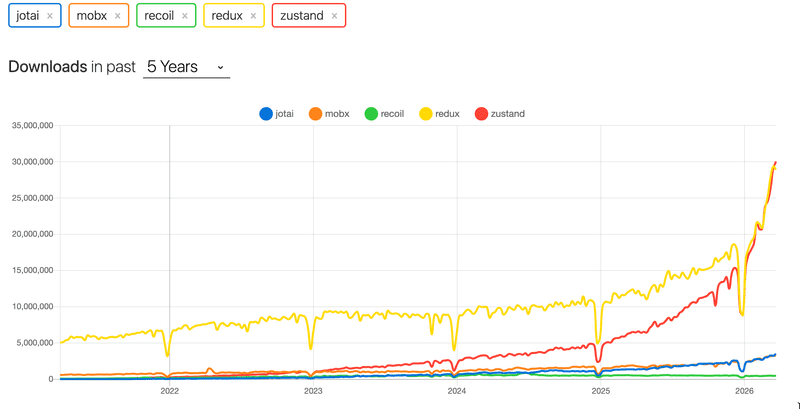
Redux, which follows the Flux architecture, was the dominant state management solution for React applications for nearly a decade. On this course, Redux was also used until spring 2026. Redux has always been plagued by complexity and a large amount of boilerplate code. The situation improved significantly with the introduction of Redux Toolkit, but despite this, the community continued to develop alternative state management solutions, such as MobX, Recoil and Jotai. Their popularity has varied.
The most interesting, and without a doubt the most popular of the new arrivals is Zustand, and it is also our choice for a state management solution. Zustand appears to have already caught up with Redux in popularity:
Zustand
Let's get familiar with Zustand by once again implementing a counter application:

Create a new Vite application and install Zustand:
npm install zustandThe first version, where only the counter increment works, is as follows:
import { create } from 'zustand'

const useCounterStore = create(set => ({
  counter: 0,
  increment: () => set(state => ({ counter: state.counter + 1 })),
}))

const App = () => {
  const counter = useCounterStore(state => state.counter)
  const increment = useCounterStore(state => state.increment)

  return (
    <div>
      <div>{counter}</div>
      <div>
        <button onClick={increment}>plus</button>
        <button>minus</button>
        <button>zero</button>
      </div>

    </div>
  )
}
The application starts by creating the store, i.e., the global state, using Zustand's create function:
import { create } from 'zustand'

const useCounterStore = create(set => ({
  counter: 0,
  increment: () => set(state => ({ counter: state.counter + 1 })),
}))
The function receives as a parameter a function that returns the state to be defined for the application. The parameter is thus the following:
set => ({
  counter: 0,
  increment: () => set(state => ({ counter: state.counter + 1 })),
})
The state thus has counter defined with a value of zero, and increment which is a function.
The application's components can access the values and functions defined in the state through the useCounterStore function defined using Zustand's create. The App component uses selectors to retrieve the counter value and the increment function from the state:
const App = () => {
  // using selector to pick right part of the store state  const counter = useCounterStore(state => state.counter)  const increment = useCounterStore(state => state.increment)
  return (
    <div>
      <div>{counter}</div>      <div>
        <button onClick={increment}>plus</button>        <button>minus</button>
        <button>zero</button>
      </div>

    </div>
  )
}
The code stores counter value of the store into a variable as follows:
const counter = useCounterStore(state => state.counter)A selector function state => state.counter is used, which determines what is returned from the store's contents. In the same way, the function stored in the store is retrieved into the variable increment.
The state function increment, which was defined as follows, is given as the click handler for the "plus" button:
const useCounterStore = create(set => ({
  counter: 0,
  increment: () => set(state => ({ counter: state.counter + 1 })),}))
Let's look at the function definition separately:
() => set(state => ({ counter: state.counter + 1 }))This is a function that calls the set function giving another function as a parameter. This function passed as a parameter defines how the state changes:
state => ({ counter: state.counter + 1 })which is shorthand for:
state => {
  return { counter: state.counter + 1 }
}
The function returns a new state, which it computes based on the old state that it can access using the parameter state. So if the old state is, for example:
{
  counter: 1,
  increment: // function definition
}
the new state becomes:
{
  counter: 2,
  increment: // function definition
}
The state always also contains the state-changing function increment.
The state transition function
state => ({ counter: state.counter + 1 })only affects the counter value in the state.
Nothing would prevent changing the function in the state within the state transition function; for example, if we defined it as follows:
state => {
  return {
    counter: state.counter + 1 ,
    increment: console.log('increment broken')
  }
}
the increment button would only work the first time; after that, pressing the button would only print to the console.
When the new state is set as:
state => ({ counter: state.counter + 1 })only the value of the counter key in the state is updated; the new state is obtained by merging the old state with the value returned by the state-changing function. This is why the following state transition function:
state => ({})does not affect the state at all.
Let's complete the application for the remaining buttons as well:
const useCounterStore = create(set => ({
  counter: 0,
  increment: () => set(state => ({ counter: state.counter + 1 })),
  decrement: () => set(state => ({ counter: state.counter - 1 })),
  zero: () => set(() => ({ counter: 0 })),
}))

const App = () => {
  const counter = useCounterStore(state => state.counter)
  const increment = useCounterStore(state => state.increment)
  const decrement = useCounterStore(state => state.decrement)
  const zero = useCounterStore(state => state.zero)

  return (
    <div>
      <div>{counter}</div>
      <div>
        <button onClick={increment}>plus</button>
        <button onClick={decrement}>minus</button>
        <button onClick={zero}>zero</button>
      </div>

    </div>
  )
}
Where do set and state come from?
Where does set come from? It is a helper function provided by Zustand's create function, used to update the state. create calls the parameter function it receives and automatically passes set to it. You don't need to call or import it yourself; Zustand takes care of that.
Where does state come from? When a function is given as a parameter to set (instead of a new state object directly), Zustand calls that function with the store's current state as its argument. This way, state-updating functions can access the old state to compute the new one.
Using the state from different components
Let's refactor the application so that the store definition is moved to its own file store.js, and the view is split into multiple components, each defined in their own files.
The contents of store.js are straightforward:
export const useCounterStore = create(set => ({
  counter: 0,
  increment: () => set(state => ({ counter: state.counter + 1 })),
  decrement: () => set(state => ({ counter: state.counter - 1 })),
  zero: () => set(() => ({ counter: 0 })),
}))
The App component is simplified as follows:
import Display from './Display'
import Controls from './Controls'

const App = () => {
  return (
    <div>
      <Display />
      <Controls />
    </div>
  )
}

export default App
What is noteworthy here is that the App component no longer passes state to its child components. In fact, the component does not touch the state in any way, the store definition has been fully separated outside the component.
The component that renders the counter value is simple:
import { useCounterStore } from './store'

const Display = () => {
  const counter = useCounterStore(state => state.counter)

  return (
    <div>{counter}</div>
  )
}

export default Display
The component accesses the counter value via the useCounterStore function that defines the store. This is convenient in many ways, for example, there is no need to pass the state to the component through props.
The component that defines the buttons looks like this:
import { useCounterStore } from './store'

const Controls = () => {
  const increment = useCounterStore(state => state.increment)
  const decrement = useCounterStore(state => state.decrement)
  const zero = useCounterStore(state => state.zero)

  return (
    <div>
      <button onClick={increment}>plus</button>
      <button onClick={decrement}>minus</button>
      <button onClick={zero}>zero</button>
    </div>
  )
}

export default Controls
The useCounterStore function takes a selector function as its parameter, which determines which part of the state to use. For example:
const increment = useCounterStore(state => state.increment)Here the selector function state => state.increment picks the value of the increment key from the state — the function that increments the counter — and stores it in the variable increment.
We could also access the entire state as follows:
  const state = useCounterStore()
  // does the same as useCounterStore(state => state), i.e., selects the entire state
We could then refer to the counter value and the functions using dot notation, i.e., state.counter and state.increment.
A natural question arises: would it be possible to use multiple parts of the state via destructuring:
import { useCounterStore } from './store'

const Controls = () => {
  const { increment, decrement, zero } = useCounterStore()
  return (
    <div>
      <button onClick={increment}>plus</button>
      <button onClick={decrement}>minus</button>
      <button onClick={zero}>zero</button>
    </div>
  )
}

export default Controls
The solution works, but it has a significant drawback. Destructuring causes the Controls component to be re-rendered every time the counter value changes, even though the component only displays the buttons and not the value itself.
The best practice in Zustand is therefore to select from the state exactly only those parts that are needed in the given component. A component re-renders only when the part of the state it has selected changes. When instead writing:
  const increment = useCounterStore((state) => state.increment)
  const decrement = useCounterStore((state) => state.decrement)
  const zero = useCounterStore((state) => state.zero)
the component no longer reacts to changes in the counter value, because it has not selected it from the state.
Reorganizing the state
However, we can achieve quite a neat solution by reorganizing the state as follows:
export const useCounterStore = create(set => ({
  counter: 0,
  actions: {
    increment: () => set(state => ({ counter: state.counter + 1 })),
    decrement: () => set(state => ({ counter: state.counter - 1 })),
    zero: () => set(() => ({ counter: 0 })),
  }
}))
The state-changing functions are now grouped under their own key actions, and they can be selected as a whole and destructured:
const Controls = () => {

  const { increment, decrement, zero } = useCounterStore(state => state.actions)

  return (
    <div>
      <button onClick={increment}>plus</button>
      <button onClick={decrement}>minus</button>
      <button onClick={zero}>zero</button>
    </div>
  )
}
Now no re-rendering occurs, since only the functions have been selected from the state, and they remain the same for the entire lifetime of the store.
According to some best practices, it is not advisable to export the function defining the entire state for use throughout the application. Instead, smaller views that expose only the necessary parts of the state should be created from it. Let's modify store.js as follows:
import { create } from 'zustand'

const useCounterStore = create(set => ({
  counter: 0,
  actions: {
    increment: () => set(state => ({ counter: state.counter + 1 })),
    decrement: () => set(state => ({ counter: state.counter - 1 })),
    zero: () => set(() => ({ counter: 0 })),
  }
}))

// the hook functions that are used elsewhere in app
export const useCounter = () => useCounterStore(state => state.counter)
export const useCounterControls = () => useCounterStore(state => state.actions)
Now, outside the module defining the state, the functions useCounter — which returns the counter value when called — and useCounterControls — which returns the functions that modify the counter value — are available. The usage changes slightly:
import { useCounter } from './store'
const Display = () => {
  const counter = useCounter()
  return (
    <div>{counter}</div>
  )
}
import { useCounterControls } from './store'
const Controls = () => {
const { increment, decrement, zero } = useCounterControls()
return (
<div>
<button onClick={increment}>plus</button>
<button onClick={decrement}>minus</button>
<button onClick={zero}>zero</button>
</div>
)
}When using the state this way, there is no longer a need to use selector functions, as their use is hidden inside the definition of the new helper functions.
The more observant have noticed that the Zustand-related functions are named starting with the word use. The reason for this is that the function returned by Zustand's create function — in our example useCounterStore — is a React custom hook function. Our own helper functions useCounter and useCounterControls are also essentially custom hooks, because they hide the use of the custom hook useCounterStore inside them.
Custom hooks come with a set of rules, for example, their names are expected to always start with use. The rules of hooks covered in Part 1 also apply to custom hooks!
Submission repository
Unlike in previous course parts, the exercises for this part are made in a separate repository.
So create now a new repository, inside of which you copy the contents of this repository https://github.com/fullstack-hy2020/fs-statemanagement
All of the repository content (except the .git directory) must be copied to the root directory of your repository. So the content of your submission repository root should be exactly as follows:
.git
.github
.gitignore
unicafe
unicafe-tests
anecdotes
anecdotes-tests
query-anecdotes
query-anecdotes-tests
There are also automated tests for all the apps that are developed in the exercises of this part.
From 21st September it is mandatory to have passing tests for submissions
Exercise 1
6.1: Unicafe revisited
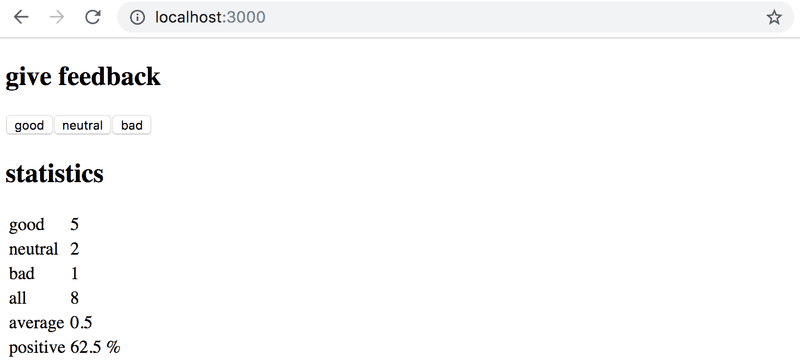
As the first exercise, you should now create a new version of the Unicafe exercise from Part 1. The application's state management should use Zustand.
Implement the full original functionality of the application in the directory unicafe.
Your application's appearance and functionality should be the same as in Part 1:
Bonus: Unicafe tests
From 21st September it is mandatory to have passing tests for submissions
The exercise repository https://github.com/fullstack-hy2020/fs-statemanagement contains tests for all the apps that are developed in the exercises of this part. Run the tests for the previous exercise locally now:
cd unicafe-tests
npm install
npx playwright install chromium
npm test
All the tests should pass, if not, fix your code.
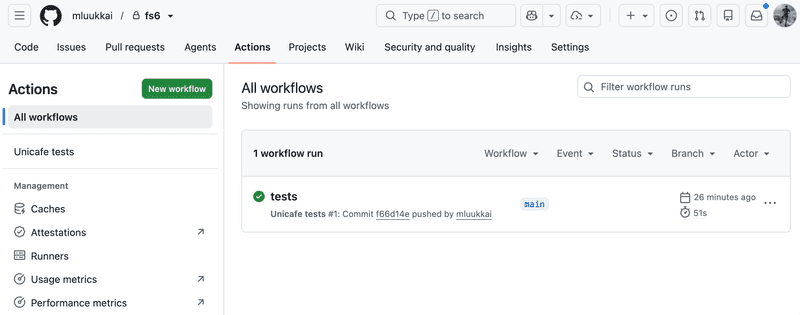
The file .github/workflows/unicafe-tests.yaml defines a GitHub Actions workflow that runs the tests on GitHub when you push code there.
Enable the tests by modifying the file as follows:
name: Unicafe tests

on:
  push:
    branches: [main]
Push your code to GitHub and make sure the tests pass:
Zustand notes
Our goal is to make a Zustand-based version of the good old notes application.
The first version of the application is the following. The App component:
import { useNotes } from './store'

const App = () => {
  const notes = useNotes()

  return (
    <div>
      <ul>
        {notes.map(note => (
          <li key={note.id}>
            {note.important ? <strong>{note.content}</strong> : note.content}
          </li>
        ))}
      </ul>
    </div>
  )
}
export default App
Store is initially defined as follows:
import { create } from 'zustand'

const useNoteStore = create(set => ({
  notes: [
    {
      id: 1,
      content: 'Zustand is less complex than Redux',
      important: true,
    },
  ],
}))

export const useNotes = () => useNoteStore(state => state.notes)
For now, the application does not have the functionality to add new notes, and the store does not yet support it. The state has been initialized with one note already added so that we can verify the application can successfully render the state.
Pure functions and immutable objects
The first attempt at an action that adds a note is the following:
note => set(
          state => {
            state.notes.push(note)
            return state
          }
        )
The function receives a note as a parameter and returns a state where a new note has been added to the old state state.
Our attempt is, however, against the rules. Zustand's documentation states Like with React's useState, we need to update state immutably. As we know, state.notes.push mutates the state object, so the solution must be changed.
The proper way is to use, for example, the Array.concat function, which does not modify the existing state but creates a new copy of it with the new note added:
note => set(
          state => {
            return { notes: state.notes.concat(note) }
          }
        )
The store definition now looks as follows:
import { create } from 'zustand'

const useNoteStore = create(set => ({
  notes: [],
  actions: {
    add: note => set(
      state => ({ notes: state.notes.concat(note) })
    )
  }
}))

export const useNotes = () => useNoteStore(state => state.notes)
export const useNoteActions = () => useNoteStore(state => state.actions)
Array spread syntax
Another commonly seen way to do the same thing is to use the array spread syntax:
state => ({ notes: [...state.notes, note] })Here, an array is formed by spreading each element of the state.notes array using spread syntax, and then appending the new note at the end. It is a matter of preference whether to use spread or the concat function.
Technically speaking, state created with Zustand is immutable, and the action functions that modify the state must be pure functions.
Pure functions are those that produce no side effects and always return the same result when called with the same parameters.
Uncontrolled form
Let's add the ability to create new notes to the application:
import { useNotes, useNoteActions } from './store'

const App = () => {
  const notes = useNotes()
  const { add } = useNoteActions()
  const generateId = () => Number((Math.random() * 1000000).toFixed(0))
  const addNote = (e) => {    e.preventDefault()    const content = e.target.note.value    add({ id: generateId(), content, important: false })    e.target.reset()  }
  return (
    <div>
      <form onSubmit={addNote}>        <input name="note" />        <button type="submit">add</button>      </form>      <ul>
        {notes.map(note => (
          <li key={note.id}>
            {note.important ? <strong>{note.content}</strong> : note.content}
          </li>
        ))}
      </ul>
    </div>
  )
}
The implementation is fairly straightforward. What is noteworthy about adding a new note is that, unlike previous React-implemented forms, we have not bound the form field's value to the state of the App component. React calls such forms uncontrolled.
Uncontrolled forms have certain limitations. They do not allow, for example, providing validation messages on the fly, disabling the submit button based on content, and so on. However, they are suitable for our use case this time. You can read more about the topic here if you wish.
The form is very simple:
<form onSubmit={addNote}>
  <input name="note" />
  <button type="submit">add</button>
</form>
What is noteworthy about the form is that the input field has a name. This allows the handler function to access the field's value.
The addition handler is also straightforward:
  const addNote = (e) => {
    e.preventDefault()
    const content = e.target.note.value
    add({ id: generateId(), content, important: false })
    e.target.reset()
  }
The content is retrieved from the form's text field using e.target.note.value into a variable, which is used as a parameter in the call to the note-adding function add.
The last line, e.target.reset(), clears the form.
The current code of the application is available in its entirety on GitHub, in the branch part6-1.
More components and functionality
Let's split the application into more components. We'll separate the creation of a new note, the list of notes, and the display of a single note into their own components.
The App component after the change is simple:
const App = () => (
  <div>
    <NoteForm />
    <NoteList />
  </div>
)
Note creation, i.e., NoteForm, doesn't contain anything dramatic, so the code is not shown here.
The component responsible for listing notes, NoteList, looks like the following:
import { useNotes } from './store'
import Note from './Note'

const NoteList = () => {
  const notes = useNotes()

  return (
    <ul>
      {notes.map(note => (
        <Note key={note.id} note={note} />
      ))}
    </ul>
  )
}
The component fetches the list of notes from the store and creates a corresponding Note component for each, passing the note's data as props:
const Note = ({ note }) => (
  <li>
    {note.important ? <strong>{note.content}</strong> : note.content}
  </li>
)
Let's also add the ability to toggle the importance of a note. The component after the change is the following:
import { useNoteActions } from './store'

const Note = ({ note }) => {
  const { toggleImportance } = useNoteActions()
  return (
    <li>
      {note.important ? <strong>{note.content}</strong> : note.content}
      <button onClick={() => toggleImportance(note.id)}>        {note.important ? 'make not important' : 'make important'}      </button>    </li>
  )
}
The component destructures the importance-toggling function from the return value of useNoteActions, and calls it when the toggle button is clicked.
The implementation of the importance-toggling function looks like the following:
import { create } from 'zustand'

const useNoteStore = create(set => ({
  notes: [],
  actions: {
    add: note => set(
      state => ({ notes: state.notes.concat(note) })
    ),
    toggleImportance: id => set(      state => ({        notes: state.notes.map(note =>          note.id === id ? { ...note, important: !note.important } : note        )      })    )  }
}))
The function receives the id of the note to be modified as a parameter. The new state is formed from the old state using the map function such that all old notes are included, except for the note to be modified, for which a version is created where its importance is toggled:
{ ...note, important: !note.important } The current code of the application is available in its entirety on GitHub, in the branch part6-2.
Exercises 6.2.-6.5.
Let's implement a new version of the anecdote voting application from Part 1.
Use the project in the anecdotes directory of the submission repository as the base for your solution.
6.2: anecdotes, step1
Implement the ability to vote for anecdotes. The number of votes must be stored in the Zustand store.
6.3: anecdotes, step2
Add the ability to add new anecdotes to the application.
You can keep the addition form uncontrolled as in the earlier example.
6.4: anecdotes, step3
Separate the creation of a new anecdote into its own component called AnecdoteForm and separate the display of the anecdote list into its own component called AnecdoteList.
After this exercise, the App component should look as follows:
import AnecdoteForm from './components/AnecdoteForm'
import AnecdoteList from './components/AnecdoteList'

const App = () => {
  return (
    <div>
      <h2>Anecdotes</h2>
      <AnecdoteList />
      <AnecdoteForm />
    </div>
  )
}

export default App
6.5: anecdotes, step4
Ensure that the anecdotes are kept in descending order by number of votes.
NOTE In this exercise it is advisable to use the Array.toSorted function, which does not sort the original array but creates a sorted copy of it. This is because the Zustand state must not be mutated!
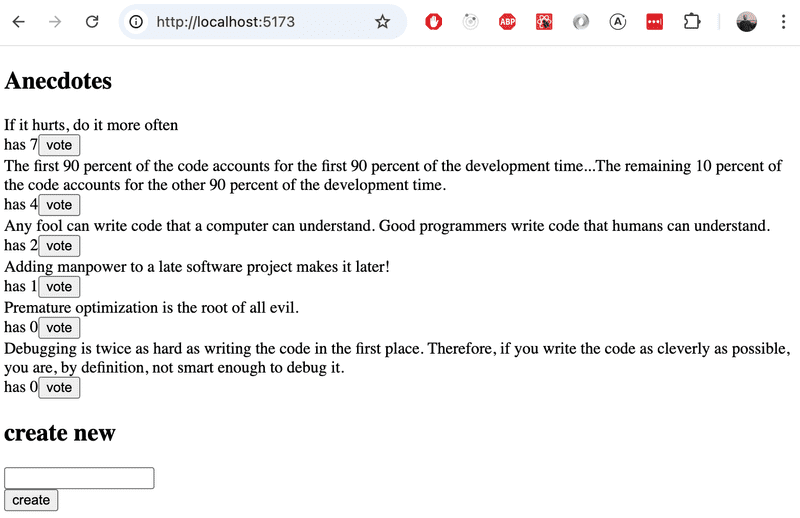
When completing the previous exercises, the application should look like this: