c
React Query, Context API
At the end of this part, we will look at a few more different ways to manage the state of an application.
Let's continue with the note application. We will focus on communication with the server. Let's start the application from scratch. The first version is as follows:
const App = () => {
  const addNote = async (event) => {
    event.preventDefault()
    const content = event.target.note.value
    event.target.reset()
    console.log(content)
  }

  const toggleImportance = (note) => {
    console.log('toggle importance of', note.id)
  }

  const notes = []

  return (
    <div>
      <h2>Notes app</h2>
      <form onSubmit={addNote}>
        <input name="note" />
        <button type="submit">add</button>
      </form>
      {notes.map((note) => (
        <li key={note.id} onClick={() => toggleImportance(note)}>
          {note.important ? <strong>{note.content}</strong> : note.content}
          <button onClick={() => toggleImportance(note.id)}>
            {note.important ? 'make not important' : 'make important'}
          </button>
        </li>
      ))}
    </div>
  )
}

export default App
The initial code is on GitHub in this repository, in the branch part6-0.
Managing data on the server with the TanStack Query library
We shall now use the TanStack Query library to store and manage data retrieved from the server.
Install the library with the command
npm install @tanstack/react-queryA few additions to the file main.jsx are needed to pass the library functions to the entire application:
import { createRoot } from 'react-dom/client'
import { QueryClient, QueryClientProvider } from '@tanstack/react-query'
import App from './App.jsx'

const queryClient = new QueryClient()
createRoot(document.getElementById('root')).render(
  <QueryClientProvider client={queryClient}>    <App />
  </QueryClientProvider>)
Let's use JSON Server as in the previous parts to simulate the backend. JSON Server is preconfigured in the example project, and the project root contains a file db.json that by default has two notes. You can start the server with:
npm run serverWe can now retrieve the notes in the App component. The code expands as follows:
import { useQuery } from '@tanstack/react-query'
const App = () => {
  const addNote = async (event) => {
    event.preventDefault()
    const content = event.target.note.value
    event.target.reset()
    console.log(content)
  }

  const toggleImportance = (note) => {
    console.log('toggle importance of', note.id)
  }

  const result = useQuery({    queryKey: ['notes'],    queryFn: async () => {      const response = await fetch('http://localhost:3001/notes')      if (!response.ok) {        throw new Error('Failed to fetch notes')      }      return await response.json()    }  })   console.log(JSON.parse(JSON.stringify(result)))   if (result.isPending) {    return <div>loading data...</div>  }   const notes = result.data
  return (
    // ...
  )
}
Fetching data from the server is done, as in the previous chapter, using the Fetch API's fetch function. However, the function call is now wrapped into a query formed by the useQuery function. The call to useQuery takes as its parameter an object with the fields queryKey and queryFn. The value of the queryKey field is an array containing the string notes. It acts as the key for the defined query, i.e. the list of notes.
The return value of the useQuery function is an object that indicates the status of the query. The output to the console illustrates the situation:
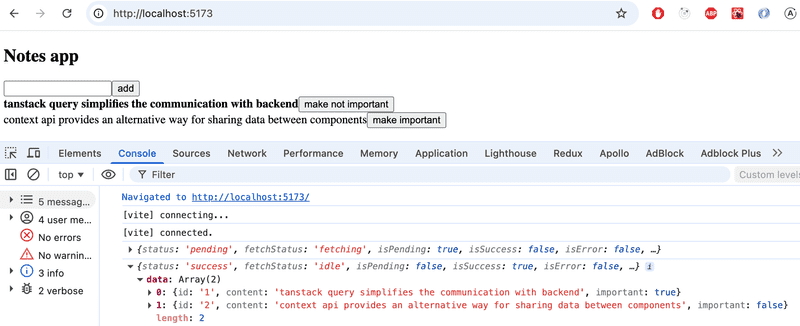
That is, the first time the component is rendered, the query is still in pending state, i.e. the associated HTTP request is pending. At this stage, only the following is rendered:
<div>loading data...</div>However, the HTTP request is completed so quickly that not even Max Verstappen would be able to see the text. When the request is completed, the component is rendered again. The query is in the state success on the second rendering, and the field data of the query object contains the data returned by the request, i.e. the list of notes that is rendered on the screen.
So the application retrieves data from the server and renders it on the screen without using the React hooks useState and useEffect used in chapters 2-5 at all. The data on the server is now entirely under the administration of the TanStack Query library, and the application does not need the state defined with React's useState hook at all!
Let's move the function making the actual HTTP request to its own file src/requests.js
const baseUrl = 'http://localhost:3001/notes'

export const getNotes = async () => {
  const response = await fetch(baseUrl)
  if (!response.ok) {
    throw new Error('Failed to fetch notes')
  }
  return await response.json()
}
The App component is now slightly simplified:
import { useQuery } from '@tanstack/react-query'
import { getNotes } from './requests'
const App = () => {
  // ...

  const result = useQuery({
    queryKey: ['notes'],
    queryFn: getNotes  })

  // ...
}
The current code for the application is in GitHub in the branch part6-1.
Synchronizing data to the server using TanStack Query
Data is already successfully retrieved from the server. Next, we will make sure that the added and modified data is stored on the server. Let's start by adding new notes.
Let's make a function createNote to the file requests.js for saving new notes:
const baseUrl = 'http://localhost:3001/notes'

export const getNotes = async () => {
  const response = await fetch(baseUrl)
  if (!response.ok) {
    throw new Error('Failed to fetch notes')
  }
  return await response.json()
}

export const createNote = async (newNote) => {  const options = {    method: 'POST',    headers: { 'Content-Type': 'application/json' },    body: JSON.stringify(newNote)  }   const response = await fetch(baseUrl, options)   if (!response.ok) {    throw new Error('Failed to create note')  }   return await response.json()}
The App component will change as follows
import { useQuery, useMutation } from '@tanstack/react-query'import { getNotes, createNote } from './requests'
const App = () => {
  const newNoteMutation = useMutation({    mutationFn: createNote,  })
  const addNote = async (event) => {
    event.preventDefault()
    const content = event.target.note.value
    event.target.reset()
    newNoteMutation.mutate({ content, important: true })  }

  //

}
To create a new note, a mutation is defined using the function useMutation:
const newNoteMutation = useMutation({
  mutationFn: createNote,
})
The parameter is the function we added to the file requests.js, which uses Fetch API to send a new note to the server.
The event handler addNote performs the mutation by calling the mutation object's function mutate and passing the new note as an argument:
newNoteMutation.mutate({ content, important: true })Our solution is good. Except it doesn't work. The new note is saved on the server, but it is not updated on the screen.
In order to render a new note as well, we need to tell TanStack Query that the old result of the query whose key is the string notes should be invalidated.
Fortunately, invalidation is easy, it can be done by defining the appropriate onSuccess callback function to the mutation:
import { useQuery, useMutation, useQueryClient } from '@tanstack/react-query'import { getNotes, createNote } from './requests'

const App = () => {
  const queryClient = useQueryClient()
  const newNoteMutation = useMutation({
    mutationFn: createNote,
    onSuccess: () => {      queryClient.invalidateQueries({ queryKey: ['notes'] })    },  })

  // ...
}
Now that the mutation has been successfully executed, a function call is made to
queryClient.invalidateQueries({ queryKey: ['notes'] })This in turn causes TanStack Query to automatically update a query with the key notes, i.e. fetch the notes from the server. As a result, the application renders the up-to-date state on the server, i.e. the added note is also rendered.
Let us also implement the change in the importance of notes. A function for updating notes is added to the file requests.js:
export const updateNote = async (updatedNote) => {
  const options = {
    method: 'PUT',
    headers: { 'Content-Type': 'application/json' },
    body: JSON.stringify(updatedNote)
  }

  const response = await fetch(`${baseUrl}/${updatedNote.id}`, options)

  if (!response.ok) {
    throw new Error('Failed to update note')
  }

  return await response.json()
}
Updating the note is also done by mutation. The App component expands as follows:
import { useQuery, useMutation, useQueryClient } from '@tanstack/react-query'
import { getNotes, createNote, updateNote } from './requests'
const App = () => {
  const queryClient = useQueryClient()

  const newNoteMutation = useMutation({
    mutationFn: createNote,
    onSuccess: () => {
      queryClient.invalidateQueries({ queryKey: ['notes'] })
    }
  })

  const updateNoteMutation = useMutation({    mutationFn: updateNote,    onSuccess: () => {      queryClient.invalidateQueries({ queryKey: ['notes'] })    }  })
  const addNote = async (event) => {
    event.preventDefault()
    const content = event.target.note.value
    event.target.reset()
    newNoteMutation.mutate({ content, important: true })
  }

  const toggleImportance = (note) => {
    updateNoteMutation.mutate({...note, important: !note.important })  }

  // ...
}
So again, the mutation we created invalidates the notes query so that the updated note is rendered correctly. Using mutations is easy, the function mutate receives a note as a parameter, the importance of which has been changed to the negation of the old value.
The current code for the application is on GitHub in the branch part6-2.
Optimizing the performance
The application works well, and the code is relatively simple. The ease of making changes to the list of notes is particularly surprising. For example, when we change the importance of a note, invalidating the query notes is enough for the application data to be updated:
const updateNoteMutation = useMutation({
  mutationFn: updateNote,
  onSuccess: () => {
    queryClient.invalidateQueries({ queryKey: ['notes'] })  }
})
The consequence of this, of course, is that after the PUT request that causes the note change, the application makes a new GET request to retrieve the query data from the server:
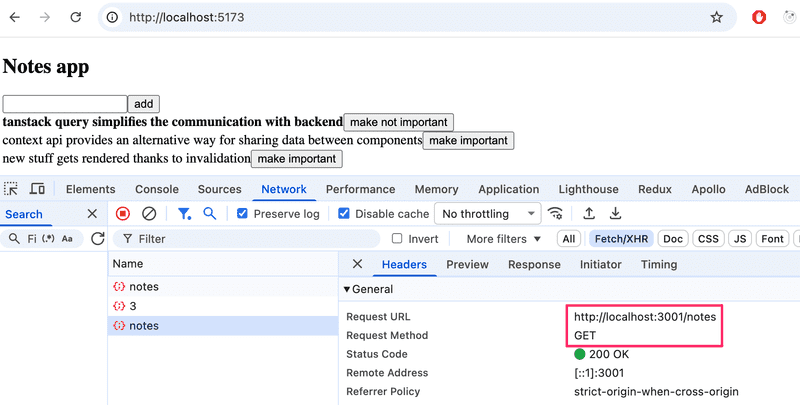
If the amount of data retrieved by the application is not large, it doesn't really matter. After all, from a browser-side functionality point of view, making an extra HTTP GET request doesn't really matter, but in some situations it might put a strain on the server.
If necessary, it is also possible to optimize performance by manually updating the query state maintained by TanStack Query.
The change for the mutation adding a new note is as follows:
const App = () => {
  const queryClient = useQueryClient()

  const newNoteMutation = useMutation({
    mutationFn: createNote,
    onSuccess: (newNote) => {      const notes = queryClient.getQueryData(['notes'])      queryClient.setQueryData(['notes'], notes.concat(newNote))    }
  })

  // ...
}
That is, in the onSuccess callback, the queryClient object first reads the existing notes state of the query and updates it by adding a new note, which is obtained as a parameter of the callback function. The value of the parameter is the value returned by the function createNote, defined in the file requests.js as follows:
export const createNote = async (newNote) => {
  const options = {
    method: 'POST',
    headers: { 'Content-Type': 'application/json' },
    body: JSON.stringify(newNote)
  }

  const response = await fetch(baseUrl, options)

  if (!response.ok) {
    throw new Error('Failed to create note')
  }

  return await response.json()}
It would be relatively easy to make a similar change to a mutation that changes the importance of the note, but we leave it as an optional exercise.
Finally, note an interesting detail. TanStack Query refetches all notes when we switch to another browser tab and then return to the application's tab. This can be observed in the Network tab of the Developer Console:
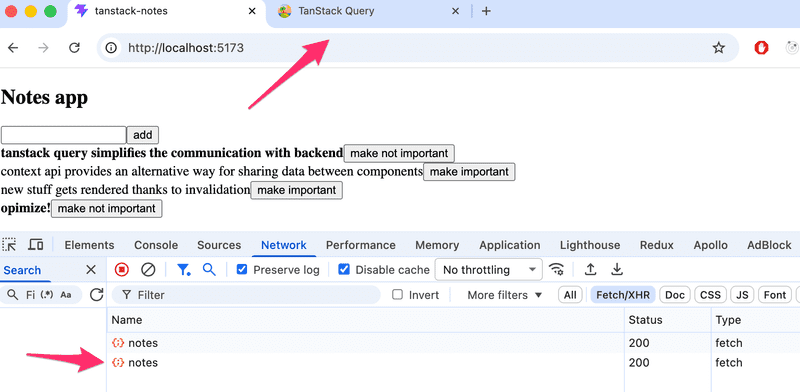
What is going on? By reading the documentation, we notice that the default functionality of TanStack Query's queries is that the queries (whose status is stale) are updated when window focus changes. If we want, we can turn off the functionality by creating a query as follows:
const App = () => {
  // ...
  const result = useQuery({
    queryKey: ['notes'],
    queryFn: getNotes,
    refetchOnWindowFocus: false  })

  // ...
}
If you put a console.log statement to the code, you can see from browser console how often TanStack Query causes the application to be re-rendered. The rule of thumb is that rerendering happens at least whenever there is a need for it, i.e. when the state of the query changes. You can read more about it e.g. here.
useNotes custom hook
Our solution is fairly good, but somewhat bothersome is the fact that many TanStack Query implementation details have been placed directly inside the React component. Let's extract these into their own custom hook function:
import { useQuery, useMutation, useQueryClient } from '@tanstack/react-query'
import { getNotes, createNote, updateNote } from '../requests'

export const useNotes = () => {
  const queryClient = useQueryClient()

  const result = useQuery({
    queryKey: ['notes'],
    queryFn: getNotes,
    refetchOnWindowFocus: false
  })

  const newNoteMutation = useMutation({
    mutationFn: createNote,
    onSuccess: (newNote) => {
      const notes = queryClient.getQueryData(['notes'])
      queryClient.setQueryData(['notes'], notes.concat(newNote))
    }
  })

  const updateNoteMutation = useMutation({
    mutationFn: updateNote,
    onSuccess: () => {
      queryClient.invalidateQueries({ queryKey: ['notes'] })
    }
  })

  return {
    notes: result.data,
    isPending: result.isPending,
    addNote: (content) => newNoteMutation.mutate({ content, important: true }),
    toggleImportance: (note) => updateNoteMutation.mutate({
      ...note, important: !note.important
    }),
  }
}
The hook function encapsulates all TanStack Query related code: the query for fetching notes and both mutations for creating and updating notes. These implementation details are hidden from the hook's user, as the function returns a simple object containing
- notes: the list of notes
- isPending: whether the data is still loading
- addNote: a function for adding a new note with just a content string
- toggleImportance: a function for toggling the importance of a note
The App component is simplified considerably:
import { useNotes } from './hooks/useNotes'

const App = () => {
  const { notes, isPending, addNote: addNoteToServer, toggleImportance } = useNotes()

  const addNote = async (event) => {
    event.preventDefault()
    const content = event.target.note.value
    event.target.reset()
    addNoteToServer(content)
  }

  if (isPending) {
    return <div>loading data...</div>
  }

  return (
    <div>
      <h2>Notes app</h2>
      <form onSubmit={addNote}>
        <input name="note" />
        <button type="submit">add</button>
      </form>
      {notes.map((note) => (
        <li key={note.id}>
          {note.important ? <strong>{note.content}</strong> : note.content}
          <button onClick={() => toggleImportance(note)}>
            {note.important ? 'make not important' : 'make important'}
          </button>
        </li>
      ))}
    </div>
  )
}
The code for the application is in GitHub in the branch part6-3.
TanStack Query is a versatile library that, based on what we have already seen, simplifies the application. Does TanStack Query make more complex state management solutions such as Zustand unnecessary? No. TanStack Query can partially replace the state of the application in some cases, but as the documentation states
- TanStack Query is a server-state library, responsible for managing asynchronous operations between your server and client
- Zustand, etc. are client-state libraries that can be used to store asynchronous data, albeit inefficiently when compared to a tool like TanStack Query
So TanStack Query is a library that maintains the server state in the frontend, i.e. acts as a cache for what is stored on the server. TanStack Query simplifies the processing of data on the server, and can in some cases eliminate the need for data on the server to be saved in the frontend state.
Most React applications need not only a way to temporarily store the served data, but also some solution for how the rest of the frontend state (e.g. the state of forms or notifications) is handled.
Exercises 6.16.-6.19.
Exercise 6.16
Now let's make a new version of the anecdote application that uses the TanStack Query library.
Use the project in the query-anecdotes directory of the submission repository as the base for your solution.
The project has a ready-installed JSON Server, the operation of which has been slightly modified (Review the server.js file for more details. Make sure you're connecting to the correct PORT). Start the server with npm run server.
The application should work in such a way that if there are problems communicating with the server, only an error page will be displayed:

You can find here info how to detect the possible errors.
You can simulate a problem with the server by e.g. turning off the JSON Server. Please note that in a problem situation, the query is first in the state isPending for a while, because if a request fails, TanStack Query tries the request a few times before it states that the request is not successful. You can optionally specify that no retries are made:
const result = useQuery(
  {
    queryKey: ['anecdotes'],
    queryFn: getAnecdotes,
    retry: false
  }
)
or that the request is retried e.g. only once:
const result = useQuery(
  {
    queryKey: ['anecdotes'],
    queryFn: getAnecdotes,
    retry: 1
  }
)
Exercise 6.17
Implement adding new anecdotes to the server using TanStack Query. The application should render a new anecdote by default. Note that the content of the anecdote must be at least 5 characters long, otherwise the server will reject the POST request. You don't have to worry about error handling now.
Exercise 6.18
Implement voting for anecdotes using again the TanStack Query. The application should automatically render the increased number of votes for the voted anecdote.
Exercise 6.19
Extract the TanStack Query details into a custom hook function.
Bonus: tests, part1
From 21st September it is mandatory to have passing tests for submissions
The exercise repository https://github.com/fullstack-hy2020/fs-statemanagement also contains tests for the app done in previous exercises.
Ensure that the tests now pass locally:
cd query-anecdote-tests
npm install
npx playwright install chromium
npm run test:anecdotes
The file .github/workflows/anecdotes-tests1.yaml defines a GitHub Actions workflow that runs the tests also on GitHub. Enable the tests by modifying the file as follows:
name: Query anecdotes tests 1

on:
  push:
    branches: [main]
Push your code to GitHub and make sure the tests pass!
Context API
Let's return to the good old counter application. The application is defined as follows:
import { useState } from 'react'
import Display from './components/Display'
import Controls from './components/Controls'

const App = () => {
  const [counter, setCounter] = useState(0)

  return (
    <div>
      <Display counter={counter} />
      <Controls counter={counter} setCounter={setCounter} />
    </div>
  )
}
The App component defines the application state and passes it to the Display component, which renders the counter value:
const Display = ({ counter }) => {

  return (
    <div>{counter}</div>
  )
}
and to the Controls component, which renders the buttons:
const Controls = ({ counter, setCounter }) => {
  const increment = () => setCounter(counter + 1)
  const decrement = () => setCounter(counter - 1)
  const zero = () => setCounter(0)

  return (
    <div>
      <button onClick={increment}>plus</button>
      <button onClick={decrement}>minus</button>
      <button onClick={zero}>zero</button>
    </div>
  )
}
The application grows:
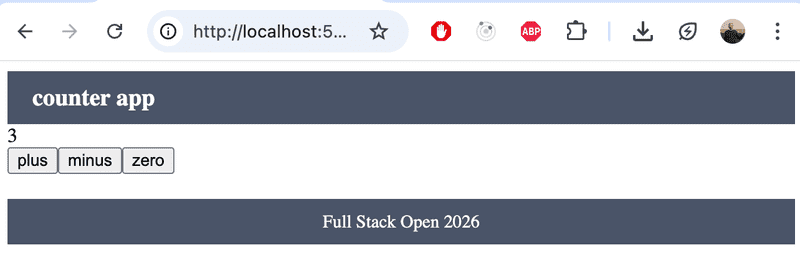
The role of the App component changes: it still holds the application state, but it no longer renders the components using the counter state directly:
const App = () => {
  const [counter, setCounter] = useState(0)

  return (
    <div>
      <Navbar />
      <Panel counter={counter} setCounter={setCounter} />
      <Footer />
    </div>
  )
}
The new Panel component is responsible for rendering the components that display the counter and the buttons:
import Display from './Display'
import Controls from './Controls'

const Panel = ({ counter, setCounter }) => {
  return (
    <div>
      <Display counter={counter} />
      <Controls counter={counter} setCounter={setCounter} />
    </div>
  )
}
The component hierarchy of the application is as follows:
App (state)
 ├── Panel
 │    ├── Display
 │    └── Controls
 └── Footer
The application state is still in the App component. To allow Display and Controls to access the counter state, the state and its update function must be passed as props through the Panel component, even though Panel itself doesn't need them. This kind of situation arises easily when using state created with the useState hook. This phenomenon is called prop drilling.
React's built-in Context API offers a solution to this problem. A React context is a kind of global state for the application, allowing any component to be given direct access to it.
Let's now create a context in the application that stores the counter state management.
A context is created using React's createContext factory function. Let's create the context in a file src/CounterContext.jsx:
import { createContext } from 'react'

const CounterContext = createContext()

export default CounterContext
The App component can now provide the context to its child components as follows:
// ...
import CounterContext from './components/CounterContext'

const App = () => {
  const [counter, setCounter] = useState(0)

  return (
    <CounterContext.Provider value={{counter, setCounter}}>      <Panel />      <Footer />
    </CounterContext.Provider>  )
}
Providing the context is done by wrapping the child components inside the CounterContext.Provider component and setting an appropriate value for the context.
The context value is now an object with the attributes counter and setCounter, i.e. the counter state and the function that updates it.
Note that the Panel component no longer receives any counter-related props, so it simplifies to:
const Panel = () => {
  return (
    <div>
      <Display />
      <Controls />
    </div>
  )
}
Other components can now access the context using the useContext hook. The Display component changes as follows:
import { useContext } from 'react'import CounterContext from './CounterContext'
const Display = () => {  const { counter } = useContext(CounterContext)
  return <div>{counter}</div>
}
The Display component no longer needs any props. It gets the counter value by calling the useContext hook with the CounterContext object as its parameter.
Similarly, the Controls component changes to:
import { useContext } from 'react'import CounterContext from './CounterContext'
const Controls = () => {
  const { counter, setCounter } = useContext(CounterContext)
  const increment = () => setCounter(counter + 1)
  const decrement = () => setCounter(counter - 1)
  const zero = () => setCounter(0)

  return (
    <div>
      <button onClick={increment}>plus</button>
      <button onClick={decrement}>minus</button>
      <button onClick={zero}>zero</button>
    </div>
  )
}

export default Controls
The components now have access to the content set by the context provider, the counter state and its update function.
The components extract the attributes they need using JavaScript's destructuring syntax:
const { counter } = useContext(CounterContext)Defining the counter context in its own file
Our application still has the unpleasant feature that the counter state management functionality is defined inside the App component. Let's move all counter-related code to the file CounterContext.jsx:
import { createContext, useState } from 'react'

const CounterContext = createContext()

export default CounterContext

export const CounterContextProvider = (props) => {  const [counter, setCounter] = useState(0)  return (    <CounterContext.Provider value={{ counter, setCounter }}>      {props.children}    </CounterContext.Provider>  )}
The file now exports both the CounterContext object and the CounterContextProvider component, which is essentially a context provider whose value contains the counter and its update function.
Let's use the context provider directly in the file main.jsx:
import { StrictMode } from 'react'
import { createRoot } from 'react-dom/client'

import App from './App'
import { CounterContextProvider } from './CounterContext'
createRoot(document.getElementById('root')).render(
  <CounterContextProvider>    <App />
  </CounterContextProvider>)
Now the context that defines the counter value and functionality is available to all components in the application.
The App component simplifies to:
import Panel from './components/Panel'
import Footer from './components/Footer'

const App = () => {

  return (
    <div>
      <Navbar />
      <Panel />
      <Footer />
  </div>
  )
}

export default App
The context is still used in the same way, and no changes are needed to the other components. For example, Controls remains:
const Controls = () => {
  const { counter, setCounter } = useContext(CounterContext)
  const increment = () => setCounter(counter + 1)
  const decrement = () => setCounter(counter - 1)
  const zero = () => setCounter(0)

  return (
    <div>
      <button onClick={increment}>plus</button>
      <button onClick={decrement}>minus</button>
      <button onClick={zero}>zero</button>
    </div>
  )
}
The solution is quite good. The entire application state, that is, the counter value, is now isolated in the CounterContext file. Components access exactly the part of the context they need using the useContext hook and JavaScript's destructuring syntax.
Let's make one small improvement and also define the counter update functions increment, decrement, and zero in the context:
import { createContext, useState } from 'react'

const CounterContext = createContext()

export default CounterContext

export const CounterContextProvider = (props) => {
  const [counter, setCounter] = useState(0)

  const increment = () => setCounter(counter + 1)  const decrement = () => setCounter(counter - 1)  const zero = () => setCounter(0)
  return (
    <CounterContext.Provider value={{ counter, increment, decrement, zero }}>      {props.children}
    </CounterContext.Provider>
  )
}
Now we can use the functions obtained from the context directly as button event handlers:
import { useContext } from 'react'
import CounterContext from '../CounterContext'

const Controls = () => {
  const { increment, decrement, zero } = useContext(CounterContext)
  return (
    <div>
      <button onClick={increment}>plus</button>
      <button onClick={decrement}>minus</button>
      <button onClick={zero}>zero</button>
    </div>
  )
}
There is still room for one more improvement. If we look at how the counter context is used, we notice that the same boilerplate appears in both components that consume it:
import { useContext } from 'react'
import CounterContext from '../CounterContext'

const Display = () => {
  const { counter } = useContext(CounterContext)
  // ...
}
import { useContext } from 'react'
import CounterContext from '../CounterContext'
const Controls = () => {
const { increment, decrement, zero } = useContext(CounterContext) // ...
}We can take the solution one step further by creating a custom hook that returns the context directly. Let's add it to the file hooks/useCounter.js:
import { useContext } from 'react'
import CounterContext from '../CounterContext'

const useCounter = () => useContext(CounterContext)

export default useCounter
Using the context is now one step simpler:
import useCounter from '../hooks/useCounter'

const Display = () => {
  const { counter } = useCounter()
  // ...
}

import useCounter from '../hooks/useCounter'

const Controls = () => {
  const { increment, decrement, zero } = useCounter()
  // ...
}
We are satisfied with the solution. It isolates all state management entirely within the context. The components that use the state have no knowledge of how the state is implemented — thanks to the custom hook, they are not even really aware that the solution is based on the Context API.
The application code is in the GitHub repository https://github.com/fullstack-hy2020/context-counter.
Exercises 6.20.-6.22.
Exercise 6.20.
The application has a Notification component for displaying notifications to the user.
Implement the application's notification state management using the Context API. The notification should tell the user when a new anecdote is created or an anecdote is voted on:
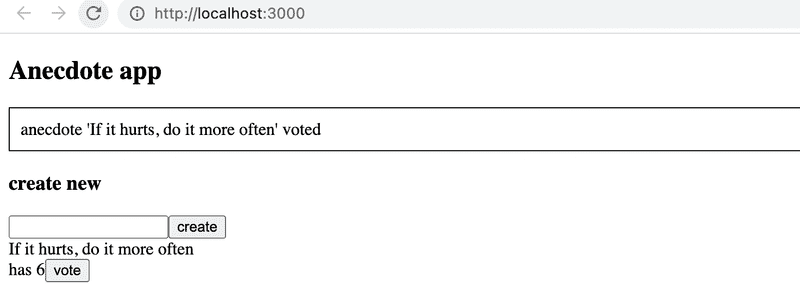
The notification is displayed for five seconds.
Exercise 6.21.
As stated in exercise 6.17, the server requires that the content of the anecdote to be added is at least 5 characters long. Now implement error handling for the insertion. In practice, it is sufficient to display a notification to the user in case of a failed POST request:
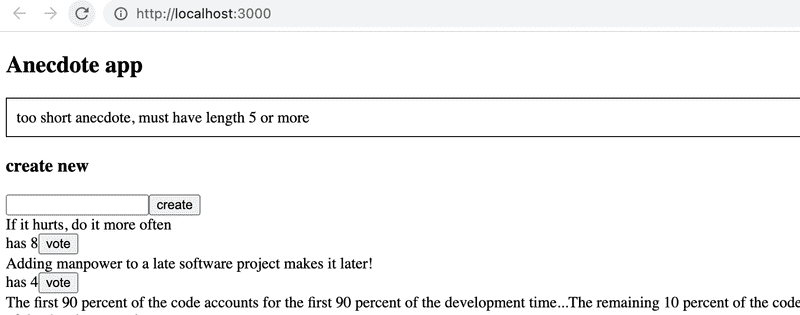
The error condition should be handled in the callback function registered for it, see here how to register a function.
Exercise 6.22.
If you haven't done so already, move the notification-related context into its own file NotificationContext.jsx, in the same way as the counter application's context was moved to CounterContext.jsx in the material. Also create a custom hook useNotify that encapsulates the notification logic. Simplify the components that use the notification so that they call the hook directly instead of calling useContext separately.
This was the last exercise for this part of the course and it's time to push your code to GitHub and mark all of your completed exercises to the exercise submission system.
Bonus: tests, part 2
From 21st September it is mandatory to have passing tests for submissions
The exercise repository https://github.com/fullstack-hy2020/fs-statemanagement also contains tests for the previous exercises.
Ensure that the tests now pass locally:
cd query-anecdote-tests
npm run test:notifications
The file .github/workflows/anecdotes-tests12yaml defines a GitHub Actions workflow that runs the tests on GitHub as well. Enable the tests by modifying the file as follows:
name: Query anecdotes tests 2

on:
  push:

    branches: [main]
Push your code to GitHub and make sure the tests pass!
Which state management solution to choose?
In chapters 1-5, all state management in the application was handled using React's useState hook. Asynchronous calls to the backend required the use of the useEffect hook in some situations. In principle, nothing else is needed.
A subtle issue with solutions based on state created with the useState hook is that if some part of the application state is needed by multiple components, the state and the functions for manipulating it must be passed via props to all components that handle that state. Sometimes props need to be passed through multiple components, and the components along the way may not even be interested in the state in any way. This somewhat unpleasant phenomenon is called prop drilling.
Over the years, several alternative solutions have been developed for state management in React applications, which can be used to ease problematic situations such as prop drilling. However, no solution has been "final" — all have their own pros and cons, and new solutions are being developed all the time.
The situation may confuse a beginner and even an experienced web developer. Which solution should be used?
For a simple application, useState is certainly a good starting point. If the application communicates with a server, the communication can be handled in the same way as in chapters 1-5, using the application's own state. Recently, however, it has become more common to move the communication and associated state management at least partially under the control of TanStack Query (or some other similar library). If you are concerned about useState and the prop drilling it entails, using context may be a good option. There are also situations where it may make sense to handle some of the state with useState and some with contexts.
For a long time, the most popular and comprehensive state management solution has been Redux, which is a way to implement the so-called Flux architecture. Redux is, however, known for its complexity and abundance of boilerplate code, which has been the motivation for newer state management solutions. In this course material, Redux has been replaced by the Zustand library, which provides equivalent functionality with a considerably simpler API. Zustand has become a popular choice especially when you need more than what useState offers, but the full Redux machinery feels excessive. Some of the criticism directed at Redux's rigidity has become outdated thanks to the Redux Toolkit, and Redux is still widely used, especially in larger projects.
Neither Zustand nor Redux has to be used throughout the entire application. It may make sense, for example, to manage form state outside of them, especially in situations where the form state does not affect the rest of the application. Using Zustand or Redux together with TanStack Query in the same application is also perfectly possible.
The question of which state management solution to use is not at all straightforward. It is impossible to give a single correct answer, and it is also likely that the chosen solution may turn out to be suboptimal as the application grows, requiring the approach to be changed even if the application has already been put into production.